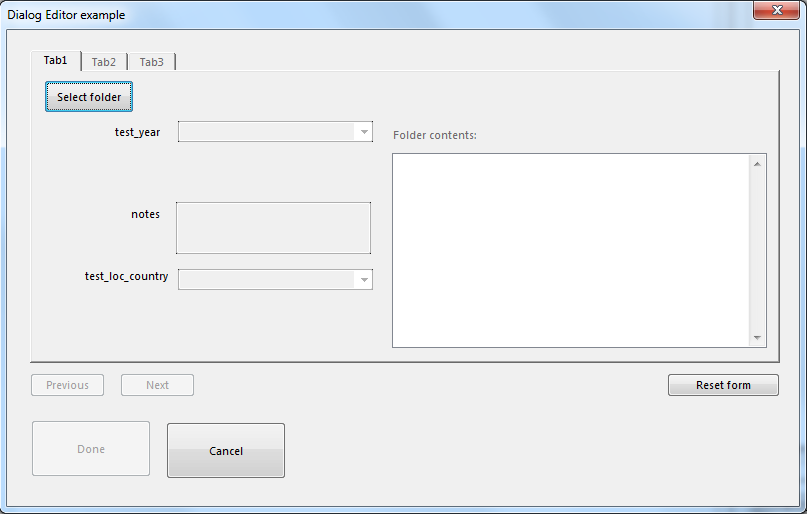
The Dialog Editor is used to create modal and non-modal dialogs with powerful GUI controls that include some specifically for working with channels. &nbps;
The sample code and dialog file provides a good example of how to create a dialog using the NI DIAdem Dialog Editor.
Download the dialog file: training_script_Dialog.SUD
'-------------------------------------------------------------------------------
'-- SUD script file
'-- Author: Mechatronic Solutions LLC
'-- Comment: Dialog Editor
'-------------------------------------------------------------------------------
Option Explicit
Call LogFileWrite("Start of dialog 'training_script_Dialog.SUD'" & vbTab & Str(Now(),"#dd ttt yyyy hh:nn:ss"))
Dim sLastFolder
'-------------------------------------------------------------------------------
'Dialog events and OK Cancel buttons
Sub Dialog_EventInitialize(ByRef This) 'Created Event Handler
Dialog.Title = "Dialog Editor example"
Dim i
For i = 2 to TabPageCtrl1.Pages.Count
TabPageCtrl1.Pages(i).Enable = False
Next
btn_PrevPage.Enable = False
btn_NextPage.Enable = False
folderContents_Lbl.Enable = False
ListBoxFolderContents.Enable = False
Call ListBoxFolderContents.Items.RemoveAll()
btn_Done.Enable = False
'
test_year_Box.Enable = False
test_year_Box.Value = -1
test_loc_country_Box.Enable = False
test_loc_country_Box.Value = -1
notes_Box.Enable = False
notes_Box.Text = ""
'
Call btn_SelectSrcFolder.SetFocus
TextSourceFolder.Text = ""
TabPageCtrl1.Pages(1).Enable = True
TabPageCtrl1.ActivePageIndex = 1
End Sub 'Dialog_EventInitialize()
Sub Dialog_EventTerminate(ByRef This) 'Created Event Handler
'Pass the source folder back to the script..
'This.SetArgument(SourceFolder)
'The last sub called before the dialog is closed.
Call LogFileWrite("End of dialog '" & This.FileName & "'" & vbTab & Str(Now(),"#dd ttt yyyy hh:nn:ss"))
End Sub
Sub btn_cancel_EventClick(ByRef This) 'Created Event Handler
'Use Dialog.Cancel to abort the dialog outside of this event.
Dialog.Cancel
End Sub
Sub btn_Done_EventClick(ByRef This) 'Created Event Handler
Dialog.OK
End Sub
Sub btn_ResetAllForms_EventClick(ByRef This) 'Created Event Handler
folderContents_Lbl.Enable = False
ListBoxFolderContents.Enable = False
Call ListBoxFolderContents.Items.RemoveAll()
btn_Done.Enable = False
'Page1
test_year_Box.Enable = False
test_year_Box.Value = -1
test_loc_country_Box.Enable = False
test_loc_country_Box.Value = -1
notes_Box.Enable = False
notes_Box.Text = ""
TextSourceFolder.Text = ""
'Page2
'Page3
'
Call btn_SelectSrcFolder.SetFocus
End Sub
'-------------------------------------------------------------------------------
'Tab page control / navigation
'
'TabPageCtrl1.ActivePageIndex are numbered from 1 to TabPageCtrl1.Pages.Count
Sub btn_NextPage_EventClick(ByRef This) 'Created Event Handler
'Display the next TabPage
'This button is only enabled if it has passed ChkStep1, .. ChkStep2
If TabPageCtrl1.ActivePageIndex < TabPageCtrl1.Pages.Count Then
'Enable the next tab, display the next tab, hide the previous tab, disable the next button
TabPageCtrl1.Pages(TabPageCtrl1.ActivePageIndex + 1).Enable = True
TabPageCtrl1.ActivePageIndex = TabPageCtrl1.ActivePageIndex + 1
TabPageCtrl1.Pages(TabPageCtrl1.ActivePageIndex - 1).Enable = False
btn_NextPage.Enable = False
If TabPageCtrl1.ActivePageIndex < TabPageCtrl1.Pages.Count Then btn_PrevPage.Enable = True
End If
Select Case TabPageCtrl1.ActivePageIndex
Case 1
Call ChkStep1()
Case 2
Call ChkStep2()
Case 3
Call ChkStep3()
End Select
End Sub
Sub btn_PrevPage_EventClick(ByRef This) 'Created Event Handler
If TabPageCtrl1.ActivePageIndex > 1 Then
'enable the previous tab, display the previous tab, disable the next tab
TabPageCtrl1.Pages(TabPageCtrl1.ActivePageIndex - 1).Enable = True
TabPageCtrl1.ActivePageIndex = TabPageCtrl1.ActivePageIndex - 1
TabPageCtrl1.Pages(TabPageCtrl1.ActivePageIndex + 1).Enable = False
btn_NextPage.Enable = False
End If
If TabPageCtrl1.ActivePageIndex = 1 Then btn_PrevPage.Enable = False
Select Case TabPageCtrl1.ActivePageIndex
Case 1
Call ChkStep1()
Case 2
Call ChkStep2()
Case 3
Call ChkStep3()
End Select
End Sub 'btn_PrevPage_EventClick()
Function ChkStep1()
'Use this function to check the values of the controls on Tab1
'and decide if the user should be allowed to continue to Tab2
ChkStep1 = False
btn_NextPage.Enable = False
'Enable btn_NextPage if the user has selected a test_year and test_loc_country option in the combo box.
If (Not test_year_Box.Value < 0) AND (Not test_loc_country_Box.Value < 0) Then
ChkStep1 = True
If TabPageCtrl1.ActivePageIndex < TabPageCtrl1.Pages.Count Then
btn_NextPage.Enable = True
Call btn_NextPage.SetFocus()
End If
End If
End Function
Function ChkStep2()
'Use this function to check the values of the controls on Tab2
'and decide if the user should be allowed to continue to Tab3
ChkStep2 = False
btn_NextPage.Enable = False
Const myTab2Conditions = True
If myTab2Conditions Then
ChkStep2 = True
If TabPageCtrl1.ActivePageIndex < TabPageCtrl1.Pages.Count Then
btn_NextPage.Enable = True
End If
End If
End Function
Function ChkStep3()
'Use this function to check the values of the controls on Tab3
'and decide if the user should be allowed to continue (Done button enabled).
ChkStep3 = False
Const myTab3Conditions = True
If myTab3Conditions Then
ChkStep3 = True
btn_Done.Enable = True
End If
End Function
'-------------------------------------------------------------------------------
'Page 1 - Data Set
Sub btn_SelectSrcFolder_EventClick(ByRef This) 'Created Event Handler
'Get a folder from the user and then populate ListBoxFolderContents with
'the filenames of the files within that folder.
Dim sFolder
sFolder = DataReadPath
If Not IsEmpty(sLastFolder) Then
If FolderExist(sLastFolder) Then
sFolder = sLastFolder
End If
End If
Select Case PathDlgShow("Select a folder",sFolder)
Case "IDCancel", "IDNo", "IDNoExecute"
Exit Sub
Case "IDOk"
Call MsgLineDisp("Scanning the contents of folder '" & OutputPath & "'..")
sLastFolder = OutputPath
Call LogFileWrite("The user selected path was '" & OutputPath & "'")
btn_SelectSrcFolder.Enable = False
test_year_box.Enable = True
notes_Box.Enable = True
TextSourceFolder.Text = OutputPath: Call TextSourceFolder.RefreshText
If Not Right(TextSourceFolder.Text,1) = "\" Then TextSourceFolder.Text = TextSourceFolder.Text & "\"
If Not bPopulateListBoxFolderContents(OutputPath) Then
Call Dialog.RunInitialize()
btn_SelectSrcFolder.Enable = True
Exit Sub
End If
If Not FolderExist(TextSourceFolder.Text) Then
Call LogFileWrite(vbTab & "Error - the passed folder '" & TextSourceFolder.Text & "' does not exist")
btn_SelectSrcFolder.Enable = True
Dialog.Cancel
Exit Sub
End If
folderContents_Lbl.Visible = True
ListBoxFolderContents.Visible = True
Call test_year_Box.SetFocus
btn_SelectSrcFolder.Enable = True
'
'Enable the test_year, daq_device, and notes controls..
test_year_Box.Enable = True
test_loc_country_Box.Enable = True
notes_Box.Enable = True
notes_Box.Text = ""
'
'Randomly assign a value..
'test_year_Box.Value = Random(test_year_box.Items.Count)
'test_loc_country_Box.Value = Random(test_loc_country_Box.Items.Count)
'
Call MsgLineDisp("Ready")
Call ChkStep1()
End Select
End Sub 'btn_SelectSrcFolder_EventClick()
Function bPopulateListBoxFolderContents(ByVal sFolder)
'Populate control ListBoxFolderContents with the
'contents from sFolder.
bPopulateListBoxFolderContents = False
ListBoxFolderContents.Enable = False
folderContents_Lbl.Enable = False
Dim arrFiles, sFile
arrFiles = DirListGet(sFolder,"*.*", "Date/Time", "Filenames")
If IsArray(arrFiles) Then
For Each sFile In arrFiles
Call ListBoxFolderContents.Items.Add(sFile,ListBoxFolderContents.Items.Count+1)
Next
End If
Call ListBoxFolderContents.Refresh()
folderContents_Lbl.Enable = True
ListBoxFolderContents.Enable = True
bPopulateListBoxFolderContents = True
If IsArray(arrFiles) Then Call Erase(arrFiles)
End Function 'bPopulateListBoxFolderContents()
Sub test_year_Box_EventInitialize(ByRef This) 'Created Event Handler
test_year_Box.Items.RemoveAll()
Dim sYear
For sYear = DatePart("yyyy", Now()) to 2000 Step -1
Call test_year_box.Items.Add(sYear, test_year_box.Items.Count)
Next
End Sub
Sub test_year_Box_EventChange(ByRef This) 'Created Event Handler
Call ChkStep1()
End Sub
Sub test_loc_country_Box_EventInitialize(ByRef This) 'Created Event Handler
'Populate test_loc_country combo box with the values returned
'from function oGetCountriesByNameAsDic()
Dim oCountriesDic, sKey
Set oCountriesDic = oGetCountriesByNameAsDic()
For Each sKey In oCountriesDic
Call test_loc_country_Box.Items.Add(sKey,oCountriesDic(sKey))
Next 'sKey
Call oCountriesDic.RemoveAll(): Set oCountriesDic = Nothing
End Sub 'test_loc_country_Box_EventInitialize()
Sub test_loc_country_Box_EventChange(ByRef This) 'Created Event Handler
If test_loc_country_Box.Value < 0 Then Exit Sub
'Do something with the user selected country..
'The country name selected may be accessed from: test_loc_country_Box.Text
notes_Box.Text = test_loc_country_Box.Text
ChkStep1()
End Sub 'test_loc_country_Box_EventChange()
'Call LogFileDel()
'Dim oCountriesDic, sKey
'Set oCountriesDic = oGetCountriesByNameAsDic()
'Call LogFileWrite(oCountriesDic.Count & " country names in 'oCountriesDic'")
'For Each sKey In oCountriesDic
' Call LogFileWrite(vbTab & "'" & sKey & "'" & vbTab & oCountriesDic(sKey))
'Next 'sKey
Function oGetCountriesByNameAsDic()
'Returns a dictionary object with a list of countries by name worldwide.
'(done this way in order to insure portability of this example and avoid dependency on external files).
Set oGetCountriesByNameAsDic = CreateObject("Scripting.Dictionary")
If Not oGetCountriesByNameAsDic.Exists("Afghanistan") Then Call oGetCountriesByNameAsDic.Add("Afghanistan",1)
If Not oGetCountriesByNameAsDic.Exists("Aland Islands land Islands") Then Call oGetCountriesByNameAsDic.Add("Aland Islands land Islands",2)
If Not oGetCountriesByNameAsDic.Exists("Albania") Then Call oGetCountriesByNameAsDic.Add("Albania",3)
If Not oGetCountriesByNameAsDic.Exists("Algeria") Then Call oGetCountriesByNameAsDic.Add("Algeria",4)
If Not oGetCountriesByNameAsDic.Exists("American Samoa") Then Call oGetCountriesByNameAsDic.Add("American Samoa",5)
If Not oGetCountriesByNameAsDic.Exists("Andorra") Then Call oGetCountriesByNameAsDic.Add("Andorra",6)
If Not oGetCountriesByNameAsDic.Exists("Angola") Then Call oGetCountriesByNameAsDic.Add("Angola",7)
If Not oGetCountriesByNameAsDic.Exists("Anguilla") Then Call oGetCountriesByNameAsDic.Add("Anguilla",8)
If Not oGetCountriesByNameAsDic.Exists("Antarctica") Then Call oGetCountriesByNameAsDic.Add("Antarctica",9)
If Not oGetCountriesByNameAsDic.Exists("Antigua and Barbuda") Then Call oGetCountriesByNameAsDic.Add("Antigua and Barbuda",10)
If Not oGetCountriesByNameAsDic.Exists("Argentina") Then Call oGetCountriesByNameAsDic.Add("Argentina",11)
If Not oGetCountriesByNameAsDic.Exists("Armenia") Then Call oGetCountriesByNameAsDic.Add("Armenia",12)
If Not oGetCountriesByNameAsDic.Exists("Aruba") Then Call oGetCountriesByNameAsDic.Add("Aruba",13)
If Not oGetCountriesByNameAsDic.Exists("Australia") Then Call oGetCountriesByNameAsDic.Add("Australia",14)
If Not oGetCountriesByNameAsDic.Exists("Austria") Then Call oGetCountriesByNameAsDic.Add("Austria",15)
If Not oGetCountriesByNameAsDic.Exists("Azerbaijan") Then Call oGetCountriesByNameAsDic.Add("Azerbaijan",16)
If Not oGetCountriesByNameAsDic.Exists("Bahamas") Then Call oGetCountriesByNameAsDic.Add("Bahamas",17)
If Not oGetCountriesByNameAsDic.Exists("Bahrain") Then Call oGetCountriesByNameAsDic.Add("Bahrain",18)
If Not oGetCountriesByNameAsDic.Exists("Bangladesh") Then Call oGetCountriesByNameAsDic.Add("Bangladesh",19)
If Not oGetCountriesByNameAsDic.Exists("Barbados") Then Call oGetCountriesByNameAsDic.Add("Barbados",20)
If Not oGetCountriesByNameAsDic.Exists("Belarus") Then Call oGetCountriesByNameAsDic.Add("Belarus",21)
If Not oGetCountriesByNameAsDic.Exists("Belgium") Then Call oGetCountriesByNameAsDic.Add("Belgium",22)
If Not oGetCountriesByNameAsDic.Exists("Belize") Then Call oGetCountriesByNameAsDic.Add("Belize",23)
If Not oGetCountriesByNameAsDic.Exists("Benin") Then Call oGetCountriesByNameAsDic.Add("Benin",24)
If Not oGetCountriesByNameAsDic.Exists("Bermuda") Then Call oGetCountriesByNameAsDic.Add("Bermuda",25)
If Not oGetCountriesByNameAsDic.Exists("Bhutan") Then Call oGetCountriesByNameAsDic.Add("Bhutan",26)
If Not oGetCountriesByNameAsDic.Exists("Bolivia") Then Call oGetCountriesByNameAsDic.Add("Bolivia",27)
If Not oGetCountriesByNameAsDic.Exists("Bosnia and Herzegovina") Then Call oGetCountriesByNameAsDic.Add("Bosnia and Herzegovina",28)
If Not oGetCountriesByNameAsDic.Exists("Botswana") Then Call oGetCountriesByNameAsDic.Add("Botswana",29)
If Not oGetCountriesByNameAsDic.Exists("Bouvet Island") Then Call oGetCountriesByNameAsDic.Add("Bouvet Island",30)
If Not oGetCountriesByNameAsDic.Exists("Brazil") Then Call oGetCountriesByNameAsDic.Add("Brazil",31)
If Not oGetCountriesByNameAsDic.Exists("British Indian Ocean Territory") Then Call oGetCountriesByNameAsDic.Add("British Indian Ocean Territory",32)
If Not oGetCountriesByNameAsDic.Exists("Brunei Darussalam") Then Call oGetCountriesByNameAsDic.Add("Brunei Darussalam",33)
If Not oGetCountriesByNameAsDic.Exists("Bulgaria") Then Call oGetCountriesByNameAsDic.Add("Bulgaria",34)
If Not oGetCountriesByNameAsDic.Exists("Burkina Faso") Then Call oGetCountriesByNameAsDic.Add("Burkina Faso",35)
If Not oGetCountriesByNameAsDic.Exists("Burundi") Then Call oGetCountriesByNameAsDic.Add("Burundi",36)
If Not oGetCountriesByNameAsDic.Exists("Cambodia") Then Call oGetCountriesByNameAsDic.Add("Cambodia",37)
If Not oGetCountriesByNameAsDic.Exists("Cameroon") Then Call oGetCountriesByNameAsDic.Add("Cameroon",38)
If Not oGetCountriesByNameAsDic.Exists("Canada") Then Call oGetCountriesByNameAsDic.Add("Canada",39)
If Not oGetCountriesByNameAsDic.Exists("Cape Verde") Then Call oGetCountriesByNameAsDic.Add("Cape Verde",40)
If Not oGetCountriesByNameAsDic.Exists("Cayman Islands") Then Call oGetCountriesByNameAsDic.Add("Cayman Islands",41)
If Not oGetCountriesByNameAsDic.Exists("Central African Republic") Then Call oGetCountriesByNameAsDic.Add("Central African Republic",42)
If Not oGetCountriesByNameAsDic.Exists("Chad") Then Call oGetCountriesByNameAsDic.Add("Chad",43)
If Not oGetCountriesByNameAsDic.Exists("Chile") Then Call oGetCountriesByNameAsDic.Add("Chile",44)
If Not oGetCountriesByNameAsDic.Exists("China") Then Call oGetCountriesByNameAsDic.Add("China",45)
If Not oGetCountriesByNameAsDic.Exists("Christmas Island") Then Call oGetCountriesByNameAsDic.Add("Christmas Island",46)
If Not oGetCountriesByNameAsDic.Exists("Cocos (Keeling) Islands") Then Call oGetCountriesByNameAsDic.Add("Cocos (Keeling) Islands",47)
If Not oGetCountriesByNameAsDic.Exists("Colombia") Then Call oGetCountriesByNameAsDic.Add("Colombia",48)
If Not oGetCountriesByNameAsDic.Exists("Comoros") Then Call oGetCountriesByNameAsDic.Add("Comoros",49)
If Not oGetCountriesByNameAsDic.Exists("Congo") Then Call oGetCountriesByNameAsDic.Add("Congo",50)
If Not oGetCountriesByNameAsDic.Exists("Congo, Democratic Republic of the") Then Call oGetCountriesByNameAsDic.Add("Congo, Democratic Republic of the",51)
If Not oGetCountriesByNameAsDic.Exists("Cook Islands") Then Call oGetCountriesByNameAsDic.Add("Cook Islands",52)
If Not oGetCountriesByNameAsDic.Exists("Costa Rica") Then Call oGetCountriesByNameAsDic.Add("Costa Rica",53)
If Not oGetCountriesByNameAsDic.Exists("Cote d\'Ivoire Cte d\'Ivoire") Then Call oGetCountriesByNameAsDic.Add("Cote d\'Ivoire Cte d\'Ivoire",54)
If Not oGetCountriesByNameAsDic.Exists("Croatia") Then Call oGetCountriesByNameAsDic.Add("Croatia",55)
If Not oGetCountriesByNameAsDic.Exists("Cuba") Then Call oGetCountriesByNameAsDic.Add("Cuba",56)
If Not oGetCountriesByNameAsDic.Exists("Cyprus") Then Call oGetCountriesByNameAsDic.Add("Cyprus",57)
If Not oGetCountriesByNameAsDic.Exists("Czech Republic") Then Call oGetCountriesByNameAsDic.Add("Czech Republic",58)
If Not oGetCountriesByNameAsDic.Exists("Denmark") Then Call oGetCountriesByNameAsDic.Add("Denmark",59)
If Not oGetCountriesByNameAsDic.Exists("Djibouti") Then Call oGetCountriesByNameAsDic.Add("Djibouti",60)
If Not oGetCountriesByNameAsDic.Exists("Dominica") Then Call oGetCountriesByNameAsDic.Add("Dominica",61)
If Not oGetCountriesByNameAsDic.Exists("Dominican Republic") Then Call oGetCountriesByNameAsDic.Add("Dominican Republic",62)
If Not oGetCountriesByNameAsDic.Exists("Ecuador") Then Call oGetCountriesByNameAsDic.Add("Ecuador",63)
If Not oGetCountriesByNameAsDic.Exists("Egypt") Then Call oGetCountriesByNameAsDic.Add("Egypt",64)
If Not oGetCountriesByNameAsDic.Exists("El Salvador") Then Call oGetCountriesByNameAsDic.Add("El Salvador",65)
If Not oGetCountriesByNameAsDic.Exists("Equatorial Guinea") Then Call oGetCountriesByNameAsDic.Add("Equatorial Guinea",66)
If Not oGetCountriesByNameAsDic.Exists("Eritrea") Then Call oGetCountriesByNameAsDic.Add("Eritrea",67)
If Not oGetCountriesByNameAsDic.Exists("Estonia") Then Call oGetCountriesByNameAsDic.Add("Estonia",68)
If Not oGetCountriesByNameAsDic.Exists("Ethiopia") Then Call oGetCountriesByNameAsDic.Add("Ethiopia",69)
If Not oGetCountriesByNameAsDic.Exists("Falkland Islands (Malvinas)") Then Call oGetCountriesByNameAsDic.Add("Falkland Islands (Malvinas)",70)
If Not oGetCountriesByNameAsDic.Exists("Faroe Islands") Then Call oGetCountriesByNameAsDic.Add("Faroe Islands",71)
If Not oGetCountriesByNameAsDic.Exists("Fiji") Then Call oGetCountriesByNameAsDic.Add("Fiji",72)
If Not oGetCountriesByNameAsDic.Exists("Finland") Then Call oGetCountriesByNameAsDic.Add("Finland",73)
If Not oGetCountriesByNameAsDic.Exists("France") Then Call oGetCountriesByNameAsDic.Add("France",74)
If Not oGetCountriesByNameAsDic.Exists("French Guiana") Then Call oGetCountriesByNameAsDic.Add("French Guiana",75)
If Not oGetCountriesByNameAsDic.Exists("French Polynesia") Then Call oGetCountriesByNameAsDic.Add("French Polynesia",76)
If Not oGetCountriesByNameAsDic.Exists("French Southern Territories") Then Call oGetCountriesByNameAsDic.Add("French Southern Territories",77)
If Not oGetCountriesByNameAsDic.Exists("Gabon") Then Call oGetCountriesByNameAsDic.Add("Gabon",78)
If Not oGetCountriesByNameAsDic.Exists("Gambia") Then Call oGetCountriesByNameAsDic.Add("Gambia",79)
If Not oGetCountriesByNameAsDic.Exists("Georgia") Then Call oGetCountriesByNameAsDic.Add("Georgia",80)
If Not oGetCountriesByNameAsDic.Exists("Germany") Then Call oGetCountriesByNameAsDic.Add("Germany",81)
If Not oGetCountriesByNameAsDic.Exists("Ghana") Then Call oGetCountriesByNameAsDic.Add("Ghana",82)
If Not oGetCountriesByNameAsDic.Exists("Gibraltar") Then Call oGetCountriesByNameAsDic.Add("Gibraltar",83)
If Not oGetCountriesByNameAsDic.Exists("Greece") Then Call oGetCountriesByNameAsDic.Add("Greece",84)
If Not oGetCountriesByNameAsDic.Exists("Greenland") Then Call oGetCountriesByNameAsDic.Add("Greenland",85)
If Not oGetCountriesByNameAsDic.Exists("Grenada") Then Call oGetCountriesByNameAsDic.Add("Grenada",86)
If Not oGetCountriesByNameAsDic.Exists("Guadeloupe") Then Call oGetCountriesByNameAsDic.Add("Guadeloupe",87)
If Not oGetCountriesByNameAsDic.Exists("Guam") Then Call oGetCountriesByNameAsDic.Add("Guam",88)
If Not oGetCountriesByNameAsDic.Exists("Guatemala") Then Call oGetCountriesByNameAsDic.Add("Guatemala",89)
If Not oGetCountriesByNameAsDic.Exists("Guernsey") Then Call oGetCountriesByNameAsDic.Add("Guernsey",90)
If Not oGetCountriesByNameAsDic.Exists("Guinea") Then Call oGetCountriesByNameAsDic.Add("Guinea",91)
If Not oGetCountriesByNameAsDic.Exists("Guinea-Bissau") Then Call oGetCountriesByNameAsDic.Add("Guinea-Bissau",92)
If Not oGetCountriesByNameAsDic.Exists("Guyana") Then Call oGetCountriesByNameAsDic.Add("Guyana",93)
If Not oGetCountriesByNameAsDic.Exists("Haiti") Then Call oGetCountriesByNameAsDic.Add("Haiti",94)
If Not oGetCountriesByNameAsDic.Exists("Heard Island and McDonald Islands") Then Call oGetCountriesByNameAsDic.Add("Heard Island and McDonald Islands",95)
If Not oGetCountriesByNameAsDic.Exists("Holy See (Vatican City State)") Then Call oGetCountriesByNameAsDic.Add("Holy See (Vatican City State)",96)
If Not oGetCountriesByNameAsDic.Exists("Honduras") Then Call oGetCountriesByNameAsDic.Add("Honduras",97)
If Not oGetCountriesByNameAsDic.Exists("Hong Kong") Then Call oGetCountriesByNameAsDic.Add("Hong Kong",98)
If Not oGetCountriesByNameAsDic.Exists("Hungary") Then Call oGetCountriesByNameAsDic.Add("Hungary",99)
If Not oGetCountriesByNameAsDic.Exists("Iceland") Then Call oGetCountriesByNameAsDic.Add("Iceland",100)
If Not oGetCountriesByNameAsDic.Exists("India") Then Call oGetCountriesByNameAsDic.Add("India",101)
If Not oGetCountriesByNameAsDic.Exists("Indonesia") Then Call oGetCountriesByNameAsDic.Add("Indonesia",102)
If Not oGetCountriesByNameAsDic.Exists("Iran, Islamic Republic of") Then Call oGetCountriesByNameAsDic.Add("Iran, Islamic Republic of",103)
If Not oGetCountriesByNameAsDic.Exists("Iraq") Then Call oGetCountriesByNameAsDic.Add("Iraq",104)
If Not oGetCountriesByNameAsDic.Exists("Ireland") Then Call oGetCountriesByNameAsDic.Add("Ireland",105)
If Not oGetCountriesByNameAsDic.Exists("Isle of Man") Then Call oGetCountriesByNameAsDic.Add("Isle of Man",106)
If Not oGetCountriesByNameAsDic.Exists("Israel") Then Call oGetCountriesByNameAsDic.Add("Israel",107)
If Not oGetCountriesByNameAsDic.Exists("Italy") Then Call oGetCountriesByNameAsDic.Add("Italy",108)
If Not oGetCountriesByNameAsDic.Exists("Jamaica") Then Call oGetCountriesByNameAsDic.Add("Jamaica",109)
If Not oGetCountriesByNameAsDic.Exists("Japan") Then Call oGetCountriesByNameAsDic.Add("Japan",110)
If Not oGetCountriesByNameAsDic.Exists("Jersey") Then Call oGetCountriesByNameAsDic.Add("Jersey",111)
If Not oGetCountriesByNameAsDic.Exists("Jordan") Then Call oGetCountriesByNameAsDic.Add("Jordan",112)
If Not oGetCountriesByNameAsDic.Exists("Kazakhstan") Then Call oGetCountriesByNameAsDic.Add("Kazakhstan",113)
If Not oGetCountriesByNameAsDic.Exists("Kenya") Then Call oGetCountriesByNameAsDic.Add("Kenya",114)
If Not oGetCountriesByNameAsDic.Exists("Kiribati") Then Call oGetCountriesByNameAsDic.Add("Kiribati",115)
If Not oGetCountriesByNameAsDic.Exists("Korea, Democratic People\'s Republic of") Then Call oGetCountriesByNameAsDic.Add("Korea, Democratic People\'s Republic of",116)
If Not oGetCountriesByNameAsDic.Exists("Korea, Republic of") Then Call oGetCountriesByNameAsDic.Add("Korea, Republic of",117)
If Not oGetCountriesByNameAsDic.Exists("Kuwait") Then Call oGetCountriesByNameAsDic.Add("Kuwait",118)
If Not oGetCountriesByNameAsDic.Exists("Kyrgyzstan") Then Call oGetCountriesByNameAsDic.Add("Kyrgyzstan",119)
If Not oGetCountriesByNameAsDic.Exists("Lao People\'s Democratic Republic") Then Call oGetCountriesByNameAsDic.Add("Lao People\'s Democratic Republic",120)
If Not oGetCountriesByNameAsDic.Exists("Latvia") Then Call oGetCountriesByNameAsDic.Add("Latvia",121)
If Not oGetCountriesByNameAsDic.Exists("Lebanon") Then Call oGetCountriesByNameAsDic.Add("Lebanon",122)
If Not oGetCountriesByNameAsDic.Exists("Lesotho") Then Call oGetCountriesByNameAsDic.Add("Lesotho",123)
If Not oGetCountriesByNameAsDic.Exists("Liberia") Then Call oGetCountriesByNameAsDic.Add("Liberia",124)
If Not oGetCountriesByNameAsDic.Exists("Libyan Arab Jamahiriya") Then Call oGetCountriesByNameAsDic.Add("Libyan Arab Jamahiriya",125)
If Not oGetCountriesByNameAsDic.Exists("Liechtenstein") Then Call oGetCountriesByNameAsDic.Add("Liechtenstein",126)
If Not oGetCountriesByNameAsDic.Exists("Lithuania") Then Call oGetCountriesByNameAsDic.Add("Lithuania",127)
If Not oGetCountriesByNameAsDic.Exists("Luxembourg") Then Call oGetCountriesByNameAsDic.Add("Luxembourg",128)
If Not oGetCountriesByNameAsDic.Exists("Macao") Then Call oGetCountriesByNameAsDic.Add("Macao",129)
If Not oGetCountriesByNameAsDic.Exists("Macedonia, the former Yugoslav Republic of") Then Call oGetCountriesByNameAsDic.Add("Macedonia, the former Yugoslav Republic of",130)
If Not oGetCountriesByNameAsDic.Exists("Madagascar") Then Call oGetCountriesByNameAsDic.Add("Madagascar",131)
If Not oGetCountriesByNameAsDic.Exists("Malawi") Then Call oGetCountriesByNameAsDic.Add("Malawi",132)
If Not oGetCountriesByNameAsDic.Exists("Malaysia") Then Call oGetCountriesByNameAsDic.Add("Malaysia",133)
If Not oGetCountriesByNameAsDic.Exists("Maldives") Then Call oGetCountriesByNameAsDic.Add("Maldives",134)
If Not oGetCountriesByNameAsDic.Exists("Mali") Then Call oGetCountriesByNameAsDic.Add("Mali",135)
If Not oGetCountriesByNameAsDic.Exists("Malta") Then Call oGetCountriesByNameAsDic.Add("Malta",136)
If Not oGetCountriesByNameAsDic.Exists("Marshall Islands") Then Call oGetCountriesByNameAsDic.Add("Marshall Islands",137)
If Not oGetCountriesByNameAsDic.Exists("Martinique") Then Call oGetCountriesByNameAsDic.Add("Martinique",138)
If Not oGetCountriesByNameAsDic.Exists("Mauritania") Then Call oGetCountriesByNameAsDic.Add("Mauritania",139)
If Not oGetCountriesByNameAsDic.Exists("Mauritius") Then Call oGetCountriesByNameAsDic.Add("Mauritius",140)
If Not oGetCountriesByNameAsDic.Exists("Mayotte") Then Call oGetCountriesByNameAsDic.Add("Mayotte",141)
If Not oGetCountriesByNameAsDic.Exists("Mexico") Then Call oGetCountriesByNameAsDic.Add("Mexico",142)
If Not oGetCountriesByNameAsDic.Exists("Micronesia, Federated States of") Then Call oGetCountriesByNameAsDic.Add("Micronesia, Federated States of",143)
If Not oGetCountriesByNameAsDic.Exists("Moldova, Republic of") Then Call oGetCountriesByNameAsDic.Add("Moldova, Republic of",144)
If Not oGetCountriesByNameAsDic.Exists("Monaco") Then Call oGetCountriesByNameAsDic.Add("Monaco",145)
If Not oGetCountriesByNameAsDic.Exists("Mongolia") Then Call oGetCountriesByNameAsDic.Add("Mongolia",146)
If Not oGetCountriesByNameAsDic.Exists("Montenegro") Then Call oGetCountriesByNameAsDic.Add("Montenegro",147)
If Not oGetCountriesByNameAsDic.Exists("Montserrat") Then Call oGetCountriesByNameAsDic.Add("Montserrat",148)
If Not oGetCountriesByNameAsDic.Exists("Morocco") Then Call oGetCountriesByNameAsDic.Add("Morocco",149)
If Not oGetCountriesByNameAsDic.Exists("Mozambique") Then Call oGetCountriesByNameAsDic.Add("Mozambique",150)
If Not oGetCountriesByNameAsDic.Exists("Myanmar") Then Call oGetCountriesByNameAsDic.Add("Myanmar",151)
If Not oGetCountriesByNameAsDic.Exists("Namibia") Then Call oGetCountriesByNameAsDic.Add("Namibia",152)
If Not oGetCountriesByNameAsDic.Exists("Nauru") Then Call oGetCountriesByNameAsDic.Add("Nauru",153)
If Not oGetCountriesByNameAsDic.Exists("Nepal") Then Call oGetCountriesByNameAsDic.Add("Nepal",154)
If Not oGetCountriesByNameAsDic.Exists("Netherlands") Then Call oGetCountriesByNameAsDic.Add("Netherlands",155)
If Not oGetCountriesByNameAsDic.Exists("Netherlands Antilles") Then Call oGetCountriesByNameAsDic.Add("Netherlands Antilles",156)
If Not oGetCountriesByNameAsDic.Exists("New Caledonia") Then Call oGetCountriesByNameAsDic.Add("New Caledonia",157)
If Not oGetCountriesByNameAsDic.Exists("New Zealand") Then Call oGetCountriesByNameAsDic.Add("New Zealand",158)
If Not oGetCountriesByNameAsDic.Exists("Nicaragua") Then Call oGetCountriesByNameAsDic.Add("Nicaragua",159)
If Not oGetCountriesByNameAsDic.Exists("Niger") Then Call oGetCountriesByNameAsDic.Add("Niger",160)
If Not oGetCountriesByNameAsDic.Exists("Nigeria") Then Call oGetCountriesByNameAsDic.Add("Nigeria",161)
If Not oGetCountriesByNameAsDic.Exists("Niue") Then Call oGetCountriesByNameAsDic.Add("Niue",162)
If Not oGetCountriesByNameAsDic.Exists("Norfolk Island") Then Call oGetCountriesByNameAsDic.Add("Norfolk Island",163)
If Not oGetCountriesByNameAsDic.Exists("Northern Mariana Islands") Then Call oGetCountriesByNameAsDic.Add("Northern Mariana Islands",164)
If Not oGetCountriesByNameAsDic.Exists("Norway") Then Call oGetCountriesByNameAsDic.Add("Norway",165)
If Not oGetCountriesByNameAsDic.Exists("Oman") Then Call oGetCountriesByNameAsDic.Add("Oman",166)
If Not oGetCountriesByNameAsDic.Exists("Pakistan") Then Call oGetCountriesByNameAsDic.Add("Pakistan",167)
If Not oGetCountriesByNameAsDic.Exists("Palau") Then Call oGetCountriesByNameAsDic.Add("Palau",168)
If Not oGetCountriesByNameAsDic.Exists("Palestinian Territory, Occupied") Then Call oGetCountriesByNameAsDic.Add("Palestinian Territory, Occupied",169)
If Not oGetCountriesByNameAsDic.Exists("Panama") Then Call oGetCountriesByNameAsDic.Add("Panama",170)
If Not oGetCountriesByNameAsDic.Exists("Papua New Guinea") Then Call oGetCountriesByNameAsDic.Add("Papua New Guinea",171)
If Not oGetCountriesByNameAsDic.Exists("Paraguay") Then Call oGetCountriesByNameAsDic.Add("Paraguay",172)
If Not oGetCountriesByNameAsDic.Exists("Peru") Then Call oGetCountriesByNameAsDic.Add("Peru",173)
If Not oGetCountriesByNameAsDic.Exists("Philippines") Then Call oGetCountriesByNameAsDic.Add("Philippines",174)
If Not oGetCountriesByNameAsDic.Exists("Pitcairn") Then Call oGetCountriesByNameAsDic.Add("Pitcairn",175)
If Not oGetCountriesByNameAsDic.Exists("Poland") Then Call oGetCountriesByNameAsDic.Add("Poland",176)
If Not oGetCountriesByNameAsDic.Exists("Portugal") Then Call oGetCountriesByNameAsDic.Add("Portugal",177)
If Not oGetCountriesByNameAsDic.Exists("Puerto Rico") Then Call oGetCountriesByNameAsDic.Add("Puerto Rico",178)
If Not oGetCountriesByNameAsDic.Exists("Qatar") Then Call oGetCountriesByNameAsDic.Add("Qatar",179)
If Not oGetCountriesByNameAsDic.Exists("Reunion Runion") Then Call oGetCountriesByNameAsDic.Add("Reunion Runion",180)
If Not oGetCountriesByNameAsDic.Exists("Romania") Then Call oGetCountriesByNameAsDic.Add("Romania",181)
If Not oGetCountriesByNameAsDic.Exists("Russian Federation") Then Call oGetCountriesByNameAsDic.Add("Russian Federation",182)
If Not oGetCountriesByNameAsDic.Exists("Rwanda") Then Call oGetCountriesByNameAsDic.Add("Rwanda",183)
If Not oGetCountriesByNameAsDic.Exists("Saint Barthlemy") Then Call oGetCountriesByNameAsDic.Add("Saint Barthlemy",184)
If Not oGetCountriesByNameAsDic.Exists("Saint Helena") Then Call oGetCountriesByNameAsDic.Add("Saint Helena",185)
If Not oGetCountriesByNameAsDic.Exists("Saint Kitts and Nevis") Then Call oGetCountriesByNameAsDic.Add("Saint Kitts and Nevis",186)
If Not oGetCountriesByNameAsDic.Exists("Saint Lucia") Then Call oGetCountriesByNameAsDic.Add("Saint Lucia",187)
If Not oGetCountriesByNameAsDic.Exists("Saint Martin (French part)") Then Call oGetCountriesByNameAsDic.Add("Saint Martin (French part)",188)
If Not oGetCountriesByNameAsDic.Exists("Saint Pierre and Miquelon") Then Call oGetCountriesByNameAsDic.Add("Saint Pierre and Miquelon",189)
If Not oGetCountriesByNameAsDic.Exists("Saint Vincent and the Grenadines") Then Call oGetCountriesByNameAsDic.Add("Saint Vincent and the Grenadines",190)
If Not oGetCountriesByNameAsDic.Exists("Samoa") Then Call oGetCountriesByNameAsDic.Add("Samoa",191)
If Not oGetCountriesByNameAsDic.Exists("San Marino") Then Call oGetCountriesByNameAsDic.Add("San Marino",192)
If Not oGetCountriesByNameAsDic.Exists("Sao Tome and Principe") Then Call oGetCountriesByNameAsDic.Add("Sao Tome and Principe",193)
If Not oGetCountriesByNameAsDic.Exists("Saudi Arabia") Then Call oGetCountriesByNameAsDic.Add("Saudi Arabia",194)
If Not oGetCountriesByNameAsDic.Exists("Senegal") Then Call oGetCountriesByNameAsDic.Add("Senegal",195)
If Not oGetCountriesByNameAsDic.Exists("Serbia") Then Call oGetCountriesByNameAsDic.Add("Serbia",196)
If Not oGetCountriesByNameAsDic.Exists("Seychelles") Then Call oGetCountriesByNameAsDic.Add("Seychelles",197)
If Not oGetCountriesByNameAsDic.Exists("Sierra Leone") Then Call oGetCountriesByNameAsDic.Add("Sierra Leone",198)
If Not oGetCountriesByNameAsDic.Exists("Singapore") Then Call oGetCountriesByNameAsDic.Add("Singapore",199)
If Not oGetCountriesByNameAsDic.Exists("Slovakia") Then Call oGetCountriesByNameAsDic.Add("Slovakia",200)
If Not oGetCountriesByNameAsDic.Exists("Slovenia") Then Call oGetCountriesByNameAsDic.Add("Slovenia",201)
If Not oGetCountriesByNameAsDic.Exists("Solomon Islands") Then Call oGetCountriesByNameAsDic.Add("Solomon Islands",202)
If Not oGetCountriesByNameAsDic.Exists("Somalia") Then Call oGetCountriesByNameAsDic.Add("Somalia",203)
If Not oGetCountriesByNameAsDic.Exists("South Africa") Then Call oGetCountriesByNameAsDic.Add("South Africa",204)
If Not oGetCountriesByNameAsDic.Exists("South Georgia and the South Sandwich Islands") Then Call oGetCountriesByNameAsDic.Add("South Georgia and the South Sandwich Islands",205)
If Not oGetCountriesByNameAsDic.Exists("Spain") Then Call oGetCountriesByNameAsDic.Add("Spain",206)
If Not oGetCountriesByNameAsDic.Exists("Sri Lanka") Then Call oGetCountriesByNameAsDic.Add("Sri Lanka",207)
If Not oGetCountriesByNameAsDic.Exists("Sudan") Then Call oGetCountriesByNameAsDic.Add("Sudan",208)
If Not oGetCountriesByNameAsDic.Exists("Suriname") Then Call oGetCountriesByNameAsDic.Add("Suriname",209)
If Not oGetCountriesByNameAsDic.Exists("Svalbard and Jan Mayen") Then Call oGetCountriesByNameAsDic.Add("Svalbard and Jan Mayen",210)
If Not oGetCountriesByNameAsDic.Exists("Swaziland") Then Call oGetCountriesByNameAsDic.Add("Swaziland",211)
If Not oGetCountriesByNameAsDic.Exists("Sweden") Then Call oGetCountriesByNameAsDic.Add("Sweden",212)
If Not oGetCountriesByNameAsDic.Exists("Switzerland") Then Call oGetCountriesByNameAsDic.Add("Switzerland",213)
If Not oGetCountriesByNameAsDic.Exists("Syrian Arab Republic") Then Call oGetCountriesByNameAsDic.Add("Syrian Arab Republic",214)
If Not oGetCountriesByNameAsDic.Exists("Taiwan, Province of China") Then Call oGetCountriesByNameAsDic.Add("Taiwan, Province of China",215)
If Not oGetCountriesByNameAsDic.Exists("Tajikistan") Then Call oGetCountriesByNameAsDic.Add("Tajikistan",216)
If Not oGetCountriesByNameAsDic.Exists("Tanzania, United Republic of") Then Call oGetCountriesByNameAsDic.Add("Tanzania, United Republic of",217)
If Not oGetCountriesByNameAsDic.Exists("Thailand") Then Call oGetCountriesByNameAsDic.Add("Thailand",218)
If Not oGetCountriesByNameAsDic.Exists("Timor-Leste") Then Call oGetCountriesByNameAsDic.Add("Timor-Leste",219)
If Not oGetCountriesByNameAsDic.Exists("Togo") Then Call oGetCountriesByNameAsDic.Add("Togo",220)
If Not oGetCountriesByNameAsDic.Exists("Tokelau") Then Call oGetCountriesByNameAsDic.Add("Tokelau",221)
If Not oGetCountriesByNameAsDic.Exists("Tonga") Then Call oGetCountriesByNameAsDic.Add("Tonga",222)
If Not oGetCountriesByNameAsDic.Exists("Trinidad and Tobago") Then Call oGetCountriesByNameAsDic.Add("Trinidad and Tobago",223)
If Not oGetCountriesByNameAsDic.Exists("Tunisia") Then Call oGetCountriesByNameAsDic.Add("Tunisia",224)
If Not oGetCountriesByNameAsDic.Exists("Turkey") Then Call oGetCountriesByNameAsDic.Add("Turkey",225)
If Not oGetCountriesByNameAsDic.Exists("Turkmenistan") Then Call oGetCountriesByNameAsDic.Add("Turkmenistan",226)
If Not oGetCountriesByNameAsDic.Exists("Turks and Caicos Islands") Then Call oGetCountriesByNameAsDic.Add("Turks and Caicos Islands",227)
If Not oGetCountriesByNameAsDic.Exists("Tuvalu") Then Call oGetCountriesByNameAsDic.Add("Tuvalu",228)
If Not oGetCountriesByNameAsDic.Exists("Uganda") Then Call oGetCountriesByNameAsDic.Add("Uganda",229)
If Not oGetCountriesByNameAsDic.Exists("Ukraine") Then Call oGetCountriesByNameAsDic.Add("Ukraine",230)
If Not oGetCountriesByNameAsDic.Exists("United Arab Emirates") Then Call oGetCountriesByNameAsDic.Add("United Arab Emirates",231)
If Not oGetCountriesByNameAsDic.Exists("United Kingdom") Then Call oGetCountriesByNameAsDic.Add("United Kingdom",232)
If Not oGetCountriesByNameAsDic.Exists("United States") Then Call oGetCountriesByNameAsDic.Add("United States",233)
If Not oGetCountriesByNameAsDic.Exists("United States Minor Outlying Islands") Then Call oGetCountriesByNameAsDic.Add("United States Minor Outlying Islands",234)
If Not oGetCountriesByNameAsDic.Exists("Uruguay") Then Call oGetCountriesByNameAsDic.Add("Uruguay",235)
If Not oGetCountriesByNameAsDic.Exists("Uzbekistan") Then Call oGetCountriesByNameAsDic.Add("Uzbekistan",236)
If Not oGetCountriesByNameAsDic.Exists("Vanuatu") Then Call oGetCountriesByNameAsDic.Add("Vanuatu",237)
If Not oGetCountriesByNameAsDic.Exists("Venezuela") Then Call oGetCountriesByNameAsDic.Add("Venezuela",238)
If Not oGetCountriesByNameAsDic.Exists("Viet Nam") Then Call oGetCountriesByNameAsDic.Add("Viet Nam",239)
If Not oGetCountriesByNameAsDic.Exists("Virgin Islands, British") Then Call oGetCountriesByNameAsDic.Add("Virgin Islands, British",240)
If Not oGetCountriesByNameAsDic.Exists("Virgin Islands, U.S.") Then Call oGetCountriesByNameAsDic.Add("Virgin Islands, U.S.",241)
If Not oGetCountriesByNameAsDic.Exists("Wallis and Futuna") Then Call oGetCountriesByNameAsDic.Add("Wallis and Futuna",242)
If Not oGetCountriesByNameAsDic.Exists("Western Sahara") Then Call oGetCountriesByNameAsDic.Add("Western Sahara",243)
If Not oGetCountriesByNameAsDic.Exists("Yemen") Then Call oGetCountriesByNameAsDic.Add("Yemen",244)
If Not oGetCountriesByNameAsDic.Exists("Zambia") Then Call oGetCountriesByNameAsDic.Add("Zambia",245)
If Not oGetCountriesByNameAsDic.Exists("Zimbabwe") Then Call oGetCountriesByNameAsDic.Add("Zimbabwe",246)
End Function 'oGetCountriesByNameAsDic()
'-------------------------------------------------------------------------------
'Page 2 - Tab2
'-------------------------------------------------------------------------------
'Page 3 - Tab3
'-------------------------------------------------------------------------------
' General control helper functions
Function iComboBoxItemValueIdx(ByVal oComboBox, ByVal sItem)
'Returns the Value index of sItem if it exists in oComboBox,
'otherwise the value -1 if sItem not found.
'Note that .Value is 0 to to oComboBox.Items.Count - 1
'and .Items are from 1 to oComboBox.Items.Count
iComboBoxItemValueIdx = -1
If oComboBox Is Nothing Then Exit Function
Dim i
For i = 1 To oComboBox.Items.Count
If oComboBox.Items.Item(i).Text = sItem Then
'Call LogFileWrite(vbTab & "i = " & i & vbTab & oComboBox.Items(i).Text)
iComboBoxItemValueIdx = i-1
Exit For
End If
Next 'i
End Function 'iComboBoxItemValueIdx()
Function bInitComboBox(ByVal oComboBox, ByVal sXmlFilePath, ByVal sXpath)
'Initialize the ComboBox control oComboBox using the values in file sXmlFilePath
'specified by the xPath sXpath.
bInitComboBox = False
If oComboBox Is Nothing Then Exit Function
If Not FileExist(sXmlFilePath) Then
Call LogFileWrite(" ERROR - xml file path does not exist '" & sXmlFilePath & "'")
Exit Function
End If
If len(sXpath) = 0 Then Exit Function
Dim xmlDoc, oNode, i
Set xmlDoc = CreateObject("Microsoft.XMLDOM")
xmlDoc.Async = "false"
If Not xmlDoc.Load(sXmlFilePath) Then
Call LogFileWrite(vbTab & "ERROR - Fn bInitComboBox() was unable to load file '" & sXmlFilePath & "'")
Exit Function
End If
If xmlDoc.selectNodes(sXpath).Length = 0 Then Exit Function
i = 0
For Each oNode In xmlDoc.selectNodes(sXpath)
Call oComboBox.Items.Add(SF_RemoveNonPrt(oNode.firstChild.text),i)
i = i + 1
Next
If oComboBox.Items.Count > 0 Then bInitComboBox = True
Set xmlDoc = Nothing: Set oNode = Nothing
End Function 'bInitComboBox()
'-------------------------------------------------------------------------------
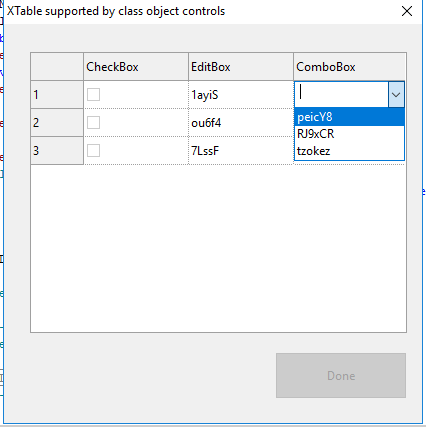
I developed this template for a dialog with an XTable linked to class controls in order to simplify the coding. The class objects included (CheckBox, EditBox, and ComboBox) can be extended if necessary, and they provide a good model for creating other control class objects. I added a few features to this to show how to achieve the desired control behaviour within the XTable event constraints.
Download the dialog file: XTable_class-controls.SUD
'-------------------------------------------------------------------------------
'-- SUD script file
'-- Author: Mark W Kiehl
' www.SavvyDiademSolutions.com
' http://www.savvysolutions.info/savvycodesolutions/
'
'-- Comment: xTable with user capability to move cell contents up/down.
'
' The contents of xTable1 are retained in a dictionary object oXTableDic
' where the key corresponds to the xTable row, and each value in oXTableDic
' consists of an array holding a class object for each control (CheckBox,
' EditBox, or ComboBox).
'
' *** NOTE: a xTable never holds data, it only displays data. ***
' XTable1_EventInitialize() populates oXTableDic with initial values.
' XTable1_EventValGet() populates the XTable with the data in oXTableDic.
' XTable1_EventValChanged() and XTable1_EventValSet() updates oXTableDic with the
' changes to the XTable1. The updates to oXTableDic from these events are
' carefully engineered to achieve the desired control behaviour.
'
' The following controls are within the xTable (see also the corresponding class objects):
' Checkbox
' EditBox
' ComboBox
'
' See Sub btn_Done_EventClick() for an example on accessing the contents of oXTableDic.
'
'-------------------------------------------------------------------------------
Option Explicit
Call LogFileDel()
Dim oXTableDic, arrXTableRow, arrXTableColNames
'oXTableDic vKey = XTable row (integer); Value = arrXTableRow(oCol1, oCol2, ... oColN)
Const bShowEvents = False
'-------------------------------------------------------------------------------
' XTable1
Sub XTable1_EventInitialize(ByRef This) 'Created Event Handler
'Initialize oXTableDic with the initial data to be shown in
'XTable1. Event XTable1_EventValGet() will update XTable1
'with the data from oXTableDic.
If bShowEvents Then Call LogFileWrite("XTable1_EventInitialize")
'Assign XTable column names to arrXTableColNames
arrXTableColNames = Array("","CheckBox","EditBox","ComboBox")
Set oXTableDic = CreateObject("Scripting.Dictionary")
Dim oCheckBox, oEditBox, oComboBox, iRow
For iRow = 1 To 3
Set oCheckBox = New c_CheckBox
'Disable CheckBox until the user makes a CombobBox selection
oCheckBox.bEnable = False
Set oEditBox = New c_EditBox
oEditBox.sText = sStrRandomAlphaChars(5)
Set oComboBox = New c_ComboBox
'NOTE: The iValue must be an integer index from 0 ...n
Call oComboBox.Add(sStrRandomAlphaChars(6),0)
Call oComboBox.Add(sStrRandomAlphaChars(6),1)
Call oComboBox.Add(sStrRandomAlphaChars(6),2)
'arrXTableRow = Array(Col 0, Col 1, Col 2, Col 3)
arrXTableRow = Array(0,oCheckBox,oEditBox,oComboBox)
Call oXTableDic.Add(iRow,arrXTableRow)
Set oCheckBox = Nothing: Set oEditBox = Nothing: Set oComboBox = Nothing
If IsArray(arrXTableRow) Then Call Erase(arrXTableRow)
Next 'iRow
'Next line very important!
XTable1.RowCount = oXTableDic.Count
End Sub
Sub XTable1_EventColCtrlPreset(ByRef This, Col, ByRef Cell, IsInputCell) 'Created Event Handler
'Executed after XTable1_EventInitialize(), once for each column, and for each column twice:
'once (for display mode) IsInputCell = True, and then the 2nd (for entry mode) IsInputCell = False.
'NOTE: You cannot assign unique values to each row using this event.
' Every control in a column must have the same value.
'
'Use XTable1_EventValGet() to populate XTable1 controls uniquely by row with the data from oXTableDic.
''Example below demonstrates use of this event (MUST disable code under XTable1_EventValGet() if implemented).
'Call LogFileWrite("XTable1_EventColCtrlPreset Col = " & Col & " IsInputCell = " & IsInputCell)
'Select Case Col
' Case 1 'CheckBox
' Cell.Value = 0
' Case 2 'EditBox
' Cell.Text = Str(Now,"#dd-ttt-yyyy hh:nn:ss AMPM")
' Case 3 'ComboBox
' Call Cell.Items.RemoveAll()
' Call Cell.FillItemsByVar("xChnStyle",True)
'End Select
End Sub
Sub XTable1_EventValGet(ByRef This, Row, Col, ByRef Cell, IsInputCell) 'Created Event Handler
'Called by XTable1_EventInitialize().
'Triggered by a XTable Cell click (before XTable1_EventCellClick().
'Triggered by a XTable Cell ComboBox selection (before XTable1_EventValChanged())
'Use XTable1_EventValGet to populate XTable1 with data from oXTableDic
Dim oCheckBox, oEditBox, oComboBox, oItem
'Table column titles
If Col => 0 AND Row = 0 Then Cell.Text = arrXTableColNames(Col)
'Create row index number label on the left border
If Col = 0 AND Row > 0 Then Cell.Text = Str(Row)
If Col > 0 AND Row > 0 Then
If bShowEvents Then Call LogFileWrite("XTable1_EventValGet Col = " & Col & " Row = " & Row & " IsInputCell = " & IsInputCell)
Select Case Col
Case 1 'CheckBox
'arrXTableRow = Array(Col 0, Col 1, Col 2, Col 3)
arrXTableRow = oXTableDic(Row)
Set oCheckbox = arrXTableRow(Col)
Cell.Value = oCheckBox.iValue
Cell.Text = oCheckBox.sText
Cell.Enable = oCheckBox.bEnable
Case 2 'EditBox
arrXTableRow = oXTableDic(Row)
Set oEditBox = arrXTableRow(Col)
Cell.Text = oEditBox.sText
Cell.Enable = oEditBox.bEnable
Case 3 'ComboBox
arrXTableRow = oXTableDic(Row)
Set oComboBox = arrXTableRow(Col)
Call Cell.Items.RemoveAll()
For Each oItem In oComboBox.Items
Call Cell.Items.Add(oItem.sKey, oItem.iValue)
Next
Cell.Value = oComboBox.iValue
Cell.Enable = oComboBox.bEnable
End Select
Set oCheckBox = Nothing: Set oEditBox = Nothing: Set oComboBox = Nothing
If IsArray(arrXTableRow) Then Call Erase(arrXTableRow)
End If
End Sub
Sub XTable1_EventValChanged(ByRef This, Row, Col, ByRef Cell) 'Created Event Handler
'Triggered when a Cell is changed (CheckBox clicked, EditBox edited, ComboBox selection made).
'Update oXTableDic with the user changed made to XTable1
If bShowEvents Then Call LogFileWrite("XTable1_EventValChanged Col = " & Col & " Row = " & Row)
If Col > 0 AND Row > 0 Then
Dim oCheckBox, oEditBox, oComboBox, oItem
Select Case Col
Case 1 'CheckBox
'arrXTableRow = Array(Col 0, Col 1, Col 2, Col 3)
arrXTableRow = oXTableDic(Row)
Set oCheckbox = arrXTableRow(Col)
oCheckBox.iValue = Cell.Value
Set arrXTableRow(Col) = oCheckBox
oXTableDic(Row) = arrXTableRow
Case 2 'EditBox
'Validate the user input to the Cell.
If Len(Cell.Text) > 0 Then
arrXTableRow = oXTableDic(Row)
Set oEditBox = arrXTableRow(Col)
oEditBox.sText = Cell.Text
Set arrXTableRow(Col) = oEditBox
oXTableDic(Row) = arrXTableRow
End If
Case 3 'ComboBox
arrXTableRow = oXTableDic(Row)
Set oComboBox = arrXTableRow(Col)
'NOTE: New values (ComboBox editing) are processed by XTable1_EventValSet()
If Cell.Items.Count = oComboBox.iCount Then
'ComboBox selection made by user
oComboBox.iValue = Cell.Value
End If
Set arrXTableRow(Col) = oComboBox
oXTableDic(Row) = arrXTableRow
End Select
Set oCheckBox = Nothing: Set oEditBox = Nothing: Set oComboBox = Nothing
If IsArray(arrXTableRow) Then Call Erase(arrXTableRow)
End If
End Sub
Sub XTable1_EventValSet(ByRef This, Row, Col, ByRef Cell) 'Created Event Handler
'Use XTable1_EventValGet to populate oXTableDic with data from XTable1
'Call LogFileWrite("XTable1_EventValSet Col = " & Col & " Row = " & Row)
Dim oComboBox
If Col > 0 AND Row > 0 Then
Select Case Col
Case 1,2 'CheckBox,EditBox,
'Nothing processed here.
Case 3 'ComboBox
'If the user edits the ComboBox (adds something new), then process
'the new entry here.
'NOTE: In order for the ComboBox control to accept user editing, you
' must manually edit the control properties for 'Entry Control'
' and change the default Combo Type from '2 - StaticDropDown' to
' '1 EditableDropDown'.
arrXTableRow = oXTableDic(Row)
Set oComboBox = arrXTableRow(Col)
If Not oComboBox.Exists(Cell.Text) AND Len(Cell.Text) > 0 Then
Call oComboBox.Add(Cell.Text,oComboBox.iCount)
oComboBox.iValue = oComboBox.iCount - 1
End If
Set arrXTableRow(Col) = oComboBox
oXTableDic(Row) = arrXTableRow
If IsArray(arrXTableRow) Then Call Erase(arrXTableRow)
Set oComboBox = Nothing
'EnableCheckBoxRowsIfRowContentsAreValid() is called by XTable1_EventValSet() and XTable1_EventCellClick()
Call EnableCheckBoxRowsIfRowContentsAreValid()
End Select
End If
End Sub
Sub XTable1_EventToolTipShow(ByRef This, Row, Col, ByRef CellToolTip) 'Created Event Handler
If bShowEvents Then Call LogFileWrite("XTable1_EventToolTipShow Col = " & Col & " Row = " & Row)
Dim oCheckBox
If Col > 0 AND Row > 0 Then
Select Case Col
Case 1
arrXTableRow = oXTableDic(Row)
Set oCheckBox = arrXTableRow(Col)
If oCheckBox.bEnable = True Then
CellToolTip = "Click to enable save for this row " & Row
Else
CellToolTip = "You must make a ComboBox selection in order to enable row " & Row
End If
End Select
End If
End Sub
Sub EnableCheckBoxRowsIfRowContentsAreValid()
'Enable the CheckBox (Col=1) for a row if the user has made a
'selection for the ComboBox (Col=3).
'Enable btn_Done if at least one CheckBox is checked.
'EnableCheckBoxRowsIfRowContentsAreValid() is called by XTable1_EventValSet() and XTable1_EventCellClick()
Dim iRow, oCheckBox, oComboBox, iCount
iCount = 0
For iRow = 1 To oXTableDic.Count
arrXTableRow = oXTableDic(iRow)
Set oCheckBox = arrXTableRow(1)
If oCheckBox.iValue = 1 Then iCount = iCount + 1
Set oComboBox = arrXTableRow(3)
If Not oComboBox.iValue = -1 Then
oCheckBox.bEnable = True
End If
Set arrXTableRow(1) = oCheckBox
oXTableDic(iRow) = arrXTableRow
Call XTable1.Refresh() 'This updates xTable1 with the changes to oXTableDic
Next
Set oCheckBox = Nothing: Set oComboBox = Nothing
If IsArray(arrXTableRow) Then Call Erase(arrXTableRow)
If iCount > 0 Then btn_Done.Enable = True
End Sub 'EnableCheckBoxRowsIfRowContentsAreValid()
Sub XTable1_EventCellClick(ByRef This, Row, Col) 'Created Event Handler
If bShowEvents Then Call LogFileWrite("XTable1_EventCellClick Col = " & Col & " Row = " & Row)
'EnableCheckBoxRowsIfRowContentsAreValid() is called by XTable1_EventValSet() and XTable1_EventCellClick()
Call EnableCheckBoxRowsIfRowContentsAreValid()
End Sub
Sub XTable1_EventContextMenuPointSelected(ByRef This, Row, Col, MenuPoint) 'Created Event Handler
If bShowEvents Then Call LogFileWrite("XTable1_EventContextMenuPointSelected() Col = " & Col & " Row = " & Row)
End Sub
Sub XTable1_EventContextMenuShowing(ByRef This, Row, Col, MenuPoints) 'Created Event Handler
'Add a new item to the context menu or submenu.
'Call MenuPoints.Add("Add Item",1)
End Sub
Sub XTable1_EventLostFocus(ByRef This) 'Created Event Handler
If bShowEvents Then Call LogFileWrite("XTable1_EventLostFocus This.ActiveCellCol = "& This.ActiveCellCol & " This.ActiveCellRow = " & This.ActiveCellRow)
End Sub
Sub XTable1_EventRefresh(ByRef This) 'Created Event Handler
If bShowEvents Then Call LogFileWrite("XTable1_EventRefresh " & This.ActiveCellCol & vbTab & This.ActiveCellRow)
End Sub
Sub XTable1_EventSelChanged(ByRef This) 'Created Event Handler
If bShowEvents Then Call LogFileWrite("XTable1_EventSelChanged "& This.ActiveCellCol & vbTab & This.ActiveCellRow)
End Sub
'-------------------------------------------------------------------------------
Class c_ComboBox
'An object to hold the data for a ListItem (ComboBox, ...)
'
' iCount - the number of ListItems
' iChars - the maximum number of characters for all of the sKey values.
' bEnable
' sText - sText and iValue relate the to currently selected value.
' iValue - If iValue = -1, no selection, otherwise 0 = first item, 1 = 2nd item, ..
Private Sub Class_Initialize()
bEnable_ = True
iCount_ = 0
iChars_ = 0
iValue_ = -1
sText = ""
End Sub 'Class_Initialize()
Private Sub Class_Terminate()
If IsArray(arrListItems) Then Call Erase(arrListItems)
End Sub 'Class_Terminate
'-------------------------------------------------------------------------------
' property bEnable
Private bEnable_
Public Property Let bEnable(bEnable__)
'Assign a value to the property bEnable
bEnable_ = bEnable__
End Property
Public Property Get bEnable
'Read the property value bEnable
bEnable = bEnable_
End Property
'-------------------------------------------------------------------------------
'-------------------------------------------------------------------------------
' property iCount
Private iCount_
Public Property Get iCount
'Read the read-only property value iCount
iCount = iCount_
End Property
'-------------------------------------------------------------------------------
'-------------------------------------------------------------------------------
' property iChars
Private iChars_
Public Property Get iChars
'Read the read-only property value Chars
iChars = iChars_
End Property
'-------------------------------------------------------------------------------
'-------------------------------------------------------------------------------
' property iValue
Private iValue_
Public Property Let iValue(iValue__)
'Assign a value to the property iValue
iValue_ = iValue__
Dim oListItem, i
i = 0
If IsArray(arrListItems) AND bArrayIsEmpty(arrListItems) = False Then
If iValue__ > uBound(arrListItems) Then Call Err.Raise(65535,,"ERROR - the iValue of " & Str(iValue__) & " exceeds the maximum index for the ListItems (0 .." & Str(iCount_ - 1) & ")")
For Each oListItem In arrListItems
If i = iValue_ Then
sText_ = oListItem.sKey
Exit For
End If
i = i + 1
Next
Else
If iValue__ => 0 Then Call Err.Raise(65535,,"ERROR - the iValue of " & Str(iValue__) & " exceeds the number of ListItems")
End If
End Property
Public Property Get iValue
'Read the property value iValue
iValue = iValue_
End Property
'-------------------------------------------------------------------------------
'-------------------------------------------------------------------------------
' property sText
Private sText_
Public Property Let sText(sText__)
'Assign a value to the property sText
sText_ = sText__
Dim oListItem, i
i = 0
If IsArray(arrListItems) AND bArrayIsEmpty(arrListItems) = False Then
iValue_ = -1
For Each oListItem In arrListItems
If oListItem.sKey = sText__ Then
iValue_ = i
Exit For
End If
i = i + 1
Next
If iValue_ = -1 Then Call Err.Raise(65535,,"ERROR - the sText of '" & Str(sText__) & "' does not exist in ListItems")
Else
If Len(sText__) > 0 Then Call Err.Raise(65535,,"ERROR - the sText of '" & Str(sText__) & "' does not exist in ListItems")
End If
End Property
Public Property Get sText
'Read the property value sText
sText = sText_
End Property
'-------------------------------------------------------------------------------
Private arrListItems
' Methods
Public Function Add(ByVal sKey, ByVal iValue)
If Len(sKey) = 0 Then Exit Function
If IsEmpty(iValue) Then Exit Function
If Len(sKey) > iChars_ Then iChars_ = Len(sKey)
Dim oListItem
Set oListItem = New c_ListItem
If IsArray(arrListItems) AND bArrayIsEmpty(arrListItems) = False Then
If Exists(sKey) Then
Call Err.Raise(65535,,"ERROR - the sText of '" & Str(sKey) & "' already exists in ListItems. Use method Exists() to test for this.")
Else
oListItem.sKey = sKey
oListItem.iValue = iValue
ReDim Preserve arrListItems(uBound(arrListItems)+1)
Set arrListItems(uBound(arrListItems)) = oListItem
End If
Else
oListItem.sKey = sKey
oListItem.iValue = iValue
ReDim arrListItems(0)
Set arrListItems(0) = oListItem
End If
iCount_ = uBound(arrListItems)+1
Set oListItem = Nothing
End Function 'Add()
Public Function Items()
Items = arrListItems
End Function 'Items()
Public Function Remove(ByVal sKey)
If Not IsArray(arrListItems) Then
Exit Function
End If
Dim oListItem, arrListItemsCopy, i, bKeyExists, iCharsMax
iCharsMax = 0
i = 0
bKeyExists = False
i = 0
For Each oListItem In arrListItems
If Len(oListItem.sKey) > iCharsMax Then iCharsMax = Len(oListItem.sKey)
If StrComp(oListItem.sKey,sKey,vbTextCompare) = 0 Then
bKeyExists = True
'Reset iValue because it currently points to the item to be removed.
If iValue_ = i Then
iValue_ = -1
sText_ = ""
End If
End If
i = i + 1
Next
iChars_ = iCharsMax
If bKeyExists Then
i = 0
ReDim arrListItemsCopy(uBound(arrListItems)-1)
For Each oListItem In arrListItems
If Not oListItem.sKey = sKey Then
Set arrListItemsCopy(i) = oListItem
i = i + 1
End If
Next
arrListItems = arrListItemsCopy
iCount_ = uBound(arrListItems)+1
If IsArray(arrListItemsCopy) Then Call Erase(arrListItemsCopy)
End If
End Function 'Remove()
Public Function RemoveAll()
If IsArray(arrListItems) Then Call Erase(arrListItems)
iCount_ = 0
iValue_ = -1
End Function 'RemoveAll()
Public Function Exists(ByVal sKey)
Exists = False
If Not IsArray(arrListItems) Then
Exit Function
End If
Dim oListItem, arrListItemsCopy, bKeyExists
bKeyExists = False
For Each oListItem In arrListItems
If StrComp(oListItem.sKey,sKey,vbTextCompare) = 0 Then
bKeyExists = True
End If
Next
If bKeyExists Then Exists = True
End Function 'Exists()
End Class 'c_ComboBox
'-------------------------------------------------------------------------------
'Call LogFileDel()
'Call Demo_C_ListItem()
'
'Sub Demo_C_ListItem()
' Dim oListItem
' Set oListItem = New c_ListItem
' oListItem.sKey = "A"
' oListItem.iValue = 10
' Call LogFileWrite("sKey, iVal = " & oListItem.sKey & vbTab & oListItem.iValue)
' Set oListItem = Nothing
'End Sub 'Demo_C_ListItem()
Class c_ListItem
'Provides for two properties, sKey and iValue corresponding to the properties for a ListItem.
Private Sub Class_Initialize()
End Sub 'Class_Initialize()
Private Sub Class_Terminate()
End Sub 'Class_Terminate
'-------------------------------------------------------------------------------
' property sKey
Private sKey_
Public Property Let sKey(sKey__)
'Assign a value to the property sKey
sKey_ = sKey__
End Property
Public Property Get sKey
'Read the property value sKey
sKey = sKey_
End Property
'-------------------------------------------------------------------------------
'-------------------------------------------------------------------------------
' property iValue
Private iValue_
Public Property Let iValue(iValue__)
'Assign a value to the property iValue
iValue_ = iValue__
End Property
Public Property Get iValue
'Read the property value iValue
iValue = iValue_
End Property
'-------------------------------------------------------------------------------
End Class 'c_ListItem
Class C_EditBox
''bEnable, sText, bReadOnly
Private Sub Class_Initialize()
bEnable_ = True
bReadOnly_ = False
sText_ = ""
End Sub 'Class_Initialize()
Private Sub Class_Terminate()
End Sub 'Class_Terminate
'-------------------------------------------------------------------------------
' property sText
Private sText_
Public Property Let sText(sText__)
'Assign a value to the property sText
sText_ = sText__
End Property
Public Property Get sText
'Read the property value sText
sText = sText_
End Property
'-------------------------------------------------------------------------------
'-------------------------------------------------------------------------------
' property bEnable
Private bEnable_
Public Property Let bEnable(bEnable__)
'Assign a value to the property bEnable
bEnable_ = bEnable__
End Property
Public Property Get bEnable
'Read the property value bEnable
bEnable = bEnable_
End Property
'-------------------------------------------------------------------------------
'-------------------------------------------------------------------------------
' property bReadOnly
Private bReadOnly_
Public Property Let bReadOnly(bReadOnly__)
'Assign a value to the property bReadOnly
bReadOnly_ = bReadOnly__
End Property
Public Property Get bReadOnly
'Read the property value bReadOnly
bReadOnly = bReadOnly_
End Property
'-------------------------------------------------------------------------------
End Class 'C_EditBox
Class C_Text
''bEnable, sText, iValue
Private Sub Class_Initialize()
bEnable_ = True
iValue_ = 0
sText_ = ""
End Sub 'Class_Initialize()
Private Sub Class_Terminate()
End Sub 'Class_Terminate
'-------------------------------------------------------------------------------
' property sText
Private sText_
Public Property Let sText(sText__)
'Assign a value to the property sText
sText_ = sText__
End Property
Public Property Get sText
'Read the property value sText
sText = sText_
End Property
'-------------------------------------------------------------------------------
'-------------------------------------------------------------------------------
' property bEnable
Private bEnable_
Public Property Let bEnable(bEnable__)
'Assign a value to the property bEnable
bEnable_ = bEnable__
End Property
Public Property Get bEnable
'Read the property value bEnable
bEnable = bEnable_
End Property
'-------------------------------------------------------------------------------
'-------------------------------------------------------------------------------
' property iValue
Private iValue_
Public Property Let iValue(iValue__)
'Assign a value to the property iValue
iValue_ = iValue__
End Property
Public Property Get iValue
'Read the property value iValue
iValue = iValue_
End Property
'-------------------------------------------------------------------------------
End Class 'C_Text
Class C_CheckBox
'bEnable sText iValue
Private Sub Class_Initialize()
bEnable_ = True
iValue_ = 0
sText_ = ""
End Sub 'Class_Initialize()
Private Sub Class_Terminate()
End Sub 'Class_Terminate
'-------------------------------------------------------------------------------
' property sText
Private sText_
Public Property Let sText(sText__)
'Assign a value to the property sText
sText_ = sText__
End Property
Public Property Get sText
'Read the property value sText
sText = sText_
End Property
'-------------------------------------------------------------------------------
'-------------------------------------------------------------------------------
' property bEnable
Private bEnable_
Public Property Let bEnable(bEnable__)
'Assign a value to the property bEnable
bEnable_ = bEnable__
End Property
Public Property Get bEnable
'Read the property value bEnable
bEnable = bEnable_
End Property
'-------------------------------------------------------------------------------
'-------------------------------------------------------------------------------
' property iValue
Private iValue_
Public Property Let iValue(iValue__)
'Assign a value to the property iValue
iValue_ = iValue__
End Property
Public Property Get iValue
'Read the property value iValue
iValue = iValue_
End Property
'-------------------------------------------------------------------------------
End Class 'C_CheckBox
'Call LogFileDel()
'Dim arrItems
'ReDim arrItems(1)
'arrItems(0) = "One"
'arrItems(1) = "Two"
'Call LogFileWrite("IsArray() = " & IsArray(arrItems))
'Call LogFileWrite("VarType(arrItems) = vbArray + vbVariant " & (VarType(arrItems) = vbArray + vbVariant))
'Call LogFileWrite("VarType(arrItems) = " & VarType(arrItems))
'Call LogFileWrite("bArrayIsEmpty() = " & bArrayIsEmpty(arrItems))
'Call LogFileWrite(vbTab)
'If IsArray(arrItems) Then Call Erase(arrItems)
'Call LogFileWrite("IsArray() = " & IsArray(arrItems))
'Call LogFileWrite("VarType(arrItems) = vbArray + vbVariant " & (VarType(arrItems) = vbArray + vbVariant))
'Call LogFileWrite("VarType(arrItems) = " & VarType(arrItems))
'Call LogFileWrite("bArrayIsEmpty() = " & bArrayIsEmpty(arrItems))
Function bArrayIsEmpty(ByVal arrArray)
'Returns TRUE if arrArray is an array, but empty.
'Returns FALSE if arrArray is not empty (has one or more values).
'You cannot execute uBound(), lBound() on an array that has been erased with: Call Erase(arrArray).
'This function allows you to determine if an array has been erased.
'Usage: ReDim arrArray() If IsArray(arrListItems) AND bArrayIsEmpty(arrListItems) = False Then
bArrayIsEmpty = False
Dim lErr, sErr, iUbound
On Error Resume Next
iUbound = uBound(arrArray)
lErr = Err.number: sErr = Err.Description: On Error Goto 0
If lErr = 9 Then
bArrayIsEmpty = True
End If
End Function 'bArrayIsEmpty()
'-------------------------------------------------------------------------------
Function sStrRandomAlphaChars(iLength)
' This function creates a string of random characters, both numbers
' and alpha, with a length of iLength. It uses Timer to seed the Rnd
' function.
sStrRandomAlphaChars = ""
Dim i, strCharBase, iPos
strCharBase = "01234ABCDEFGHIJKLMNOPQRSTUVWXYZabcdefghijklmnopqrstuvwxyz56789"
Randomize (Timer)
For i = 1 To iLength
iPos = Int((Len(strCharBase) - 1 + 1) * Rnd + 1)
'Call LogFileWrite(iPos & vbTab & "'" & Mid(strCharBase,iPos,1) & "'" & vbTab & "'" & sStrRandomAlphaChars & "'")
sStrRandomAlphaChars = sStrRandomAlphaChars & Mid(strCharBase,iPos,1)
Next
End Function 'sStrRandomAlphaChars()
'-------------------------------------------------------------------------------
Sub Dialog_EventInitialize(ByRef This) 'Created Event Handler
'btn_Done is disabled by default until at least one CheckBox
'is checked. See EnableCheckBoxRowsIfRowContentsAreValid()
btn_Done.Enable = False
End Sub
Sub Dialog_EventTerminate(ByRef This) 'Created Event Handler
Call oXTableDic.RemoveAll: Set oXTableDic = Nothing
End Sub
Sub btn_Done_EventClick(ByRef This) 'Created Event Handler
Call LogFileWrite(vbTab)
Call LogFileWrite("btn_Done_EventClick")
Dim oCheckBox, oEditBox, oComboBox, iRow
Call LogFileWrite("iRow" & vbTab & "oCheckBox.iValue" & vbTab & "oEditBox.sText" & vbTab & "oComboBox.sText")
For Each iRow In oXTableDic
arrXTableRow = oXTableDic(iRow)
Set oCheckBox = arrXTableRow(1)
Set oEditBox = arrXTableRow(2)
Set oComboBox = arrXTableRow(3)
Call LogFileWrite(iRow & vbTab & oCheckBox.iValue & vbTab & oEditBox.sText & vbTab & "'" & oComboBox.sText & "'")
Set oCheckBox = Nothing: Set oEditBox = Nothing: Set oComboBox = Nothing
If IsArray(arrXTableRow) Then Call Erase(arrXTableRow)
Next 'iRow
End Sub
'-------------------------------------------------------------------------------
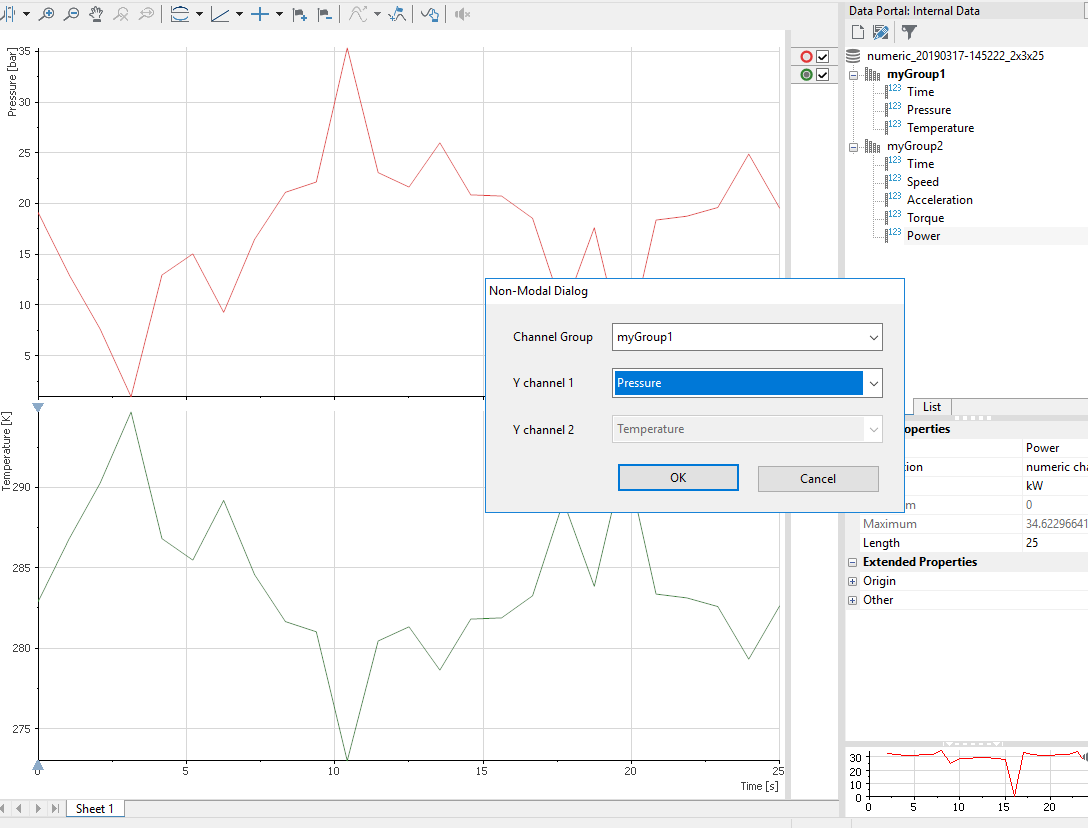
The script file and dialog (.sud) file demonstrate how to implement a non-modal dialog that populates the Data Portal with data, and then allows the user to interactively select a channel group, and then two Y channels to be plotted in the View panel (the x-channel is found programmatically).
Download the dialog file: non-modal_dialog.SUD
non-modal_dialog.vbs
'-------------------------------------------------------------------------------
'-- VBS script file non-modal_dialog.vbs
'-- Author: Mark W Kiehl
' www.SavvyDiademSolutions.com
' http://www.savvysolutions.info/savvycodesolutions/
'-- Comment:
'
' This script calls a non-modal dialog box that creates data in the Data Portal,
' and then allows the user to interactively select the channel group, and then
' two Y channels to be plotted in the View panel (the X channel is automatically
' determined).
'
'
' If you have a DIAdem script running that takes a long time to execute and you
' want a non-modal dialog to show the progress or some other action, then use
' he SUDDlgCreateEx() command to run the dialog, and set the SUDDlgkeepEnabled
' parameter to true.
'
' Note that the script that calls this non-modal dialog with SUDDlgCreate() does
' NOT contain transfer parameters that you can access in the dialog script using
' the methods GetArgument and SetArgument.
'-------------------------------------------------------------------------------
Option Explicit
Call LogFileDel()
Dim oDlg, sFilePathDlg
sFilePathDlg = CurrentScriptPath & "non-modal_dialog.sud"
Const sDlgName = "DlgNonModal" ', sDlgFilename = "non-modal_dialog.sud"
If SudNonModalDlgLst(sDlgName) Is Nothing Then
'To speed up DIAdemn, disable refreshing with UIAutoRefreshSet().
'Then to force refresh, call UIAutoRefreshSet to restore the refresh state in
'the dialog EventTerminate event.
Call LogFileWrite("SudNonModalDlgLst is not running")
Set oDlg = SUDDlgCreate(sDlgName,sFilePathDlg)
'You must call the .Show() method in order to see the dialog.
Call oDlg.Show()
Set oDlg = Nothing
Else
Call LogFileWrite("SudNonModalDlgLst is currently running")
If MsgBox("Click 'Yes' to show the dialog, 'No' to close it",vbYesNo,sDlgName) = vbYes Then
Set oDlg = SUDNonModalDlgLst(sDlgName)
Call oDlg.Show()
Set oDlg = Nothing
Else
Set oDlg = SUDNonModalDlgLst(sDlgName)
Call LogFileWrite("oDlg.FilePath & oDlg.FileName = " & oDlg.FilePath & oDlg.FileName)
Call oDlg.Cancel()
Set oDlg = Nothing
End If
End If
non-modal_dialog.SUD
'-------------------------------------------------------------------------------
'-- SUD script file non-modal_dialog.sud
'-- Author: Mark W Kiehl
' www.SavvyDiademSolutions.com
' http://www.savvysolutions.info/savvycodesolutions/
'-- Comment:
'
' This non-modal dialog box creates data in the Data Portal, and then
' allows the user to interactively select the channel group, and then
' two Y channels to be plotted in the View panel (the X channel is
' automatically determined).
'
' The Dialog 'ShowTitleMenu' property has been set to No. This prevents
' the Close icon (x) from appearing in the title bar.
'
' In a non-modal user dialog box you have only restricted access to REPORT objects
' through GraphObjOpen because these objects cannot be opened simultaneously from
' different places. Use the object-oriented REPORT interface instead.
'
' Note that the script that calls this non-modal dialog with SUDDlgCreate() does
' NOT contain transfer parameters that you can access in the dialog script using
' the methods GetArgument and SetArgument.
'
' http://zone.ni.com/reference/en-XX/help/370858N-01/genscript/genscript/sud_nonmodal/
' http://zone.ni.com/reference/en-XX/help/370858N-01/procsud/procsud/procsud_nonmodal/
'-------------------------------------------------------------------------------
Option Explicit
Dim oChnX, oChnY1, oChnY2
Sub Dialog_EventInitialize(ByRef This) 'Created Event Handler
Call LogFileWrite("Dialog_EventInitialize")
'Call LogFileWrite("Dialog.FilePath & Dialog.FileName = " & Dialog.FilePath & Dialog.FileName)
'Clear out the View panel
Call WndShow("View")
Call View.NewLayout()
'Create data in the Data Portal ..
Call Data.Root.Clear()
Portal.Visible = True
Call bCreateSampleNumericData()
End Sub
Sub ChnGrp_EventInitialize(ByRef This) 'Created Event Handler
Dim oGrp
Call ChnGrp.Items.RemoveAll()
For Each oGrp In Data.Root.ChannelGroups()
Call ChnGrp.Items.Add(oGrp.Name, ChnGrp.Items.Count)
Next
Call ChnY1.Items.RemoveAll()
ChnY1.Enable = False
Call ChnY2.Items.RemoveAll()
ChnY2.Enable = False
End Sub
Sub ChnGrp_EventChange(ByRef This) 'Created Event Handler
Dim oChn
If ChnGrp.Value >= 0 Then
Call Data.Root.ChannelGroups(ChnGrp.Text).Activate()
Set oChnX = Data.Root.ChannelGroups(ChnGrp.Text).Channels("Time")
ChnY1.Enable = True
Call ChnY1.Items.RemoveAll()
ChnY2.Enable = False
Call ChnY2.Items.RemoveAll()
For Each oChn In Data.Root.ChannelGroups(ChnGrp.Text).Channels()
If Not oChn.Name = oChnX.Name Then
Call ChnY1.Items.Add(oChn.Name,ChnY1.Items.Count)
End If
Next
End If
End Sub
Sub ChnY1_EventChange(ByRef This) 'Created Event Handler
Dim oChn
If ChnY1.Value >= 0 Then
Set oChnY1 = Data.Root.ChannelGroups(ChnGrp.Text).Channels(ChnY1.Text)
ChnY2.Enable = True
Call ChnY2.Items.RemoveAll()
For Each oChn In Data.Root.ChannelGroups(ChnGrp.Text).Channels()
If oChn.Name = oChnX.Name OR oChn.Name = oChnY1.Name Then
'ignore
Else
Call ChnY2.Items.Add(oChn.Name,ChnY2.Items.Count)
End If
Next
If ChnY2.Items.Count = 1 Then
ChnY2.Value = 0
ChnY2.Enable = False
Call PlotXY1Y2()
End If
End If
End Sub
Sub PlotXY1Y2()
Dim oGrp, oElementList
Set oGrp = Data.Root.ChannelGroups(ChnGrp.Text)
Set oElementList = Data.CreateElementList()
Call oElementList.Add(oGrp.Channels(oChnX.Name))
Call oElementList.Add(oGrp.Channels(oChnY1.Name))
Call oElementList.Add(oGrp.Channels(oChnY2.Name))
If Not b2dPlotToViewByElementList(oElementList) Then
Call LogFileWrite("ERROR - b2dPlotToViewByElementList()")
Call Dialog.Cancel()
End If
Set oElementList = Nothing: Set oGrp = Nothing
End Sub
Sub ChnY2_EventChange(ByRef This) 'Created Event Handler
If ChnY2.Value >= 0 Then
Set oChnY2 = Data.Root.ChannelGroups(ChnGrp.Text).Channels(ChnY2.Text)
Call PlotXY1Y2()
End If
End Sub
'-------------------------------------------------------------------------------
'Call bCreateSampleNumericData()
Function bCreateSampleNumericData()
bCreateSampleNumericData = False
Const iSamples = 25
Dim oFileProps, oGrpProps, oChnProps, sDate, dtDate
Set oFileProps = CreateObject("Scripting.Dictionary")
Set oGrpProps = CreateObject("Scripting.Dictionary")
Set oChnProps = CreateObject("Scripting.Dictionary")
dtDate = Now()
sDate = str(dtDate,"#yyyymmdd-hhnnss")
Call oFileProps.Add("description","simulated data created " & sDate & " 1 grps with 3 chns with " & iSamples & " samples")
'Call oFileProps.Add("title","AS_AnalyzeDataFile_ComparativeEval")
Call oFileProps.Add("author", "Mark Kiehl")
Call oFileProps.Add("sourceoriginalname", CurrentScriptName)
Call oFileProps.Add("datetime",dtDate)
Call oGrpProps.Add("description","explicit channels")
Call oGrpProps.Add("sourceoriginalname","www.SavvyDiademSolutions.com")
Call oChnProps.Add("description","numeric channel data")
Call dCreateSampleNumericChnDataInDataPortal(iSamples, oFileProps, oGrpProps, oChnProps)
Data.Root.Name = "numeric_" & sDate & "_2x3x" & Str(iSamples)
Call oFileProps.RemoveAll(): Set oFileProps = Nothing
Call oGrpProps.RemoveAll(): Set oGrpProps = Nothing
Call oChnProps.RemoveAll(): Set oChnProps = Nothing
bCreateSampleNumericData = True
End Function 'bCreateSampleNumericData()
Function dCreateSampleNumericChnDataInDataPortal(ByVal iSamples, ByVal oFileProps, ByVal oGrpProps, ByVal oChnProps)
'Creates simulated data in the Data Portal and returns the amount of
'time in seconds it took to do it.
'
Const iGrps = 2
Call MsgLineDisp("Creating " & Str(iGrps) & " grps with 3 chns with " & iSamples & " samples")
dCreateSampleNumericChnDataInDataPortal = 0.0
Call Data.Root.Clear()
Const dpTimer = 25
Call StopWatchReset(dpTimer)
Dim g, oGrp, oChnT, oChn, s, c, sPropName, vPropVal, dConst
Dim oElementList, sChn, dValStart, dValEnd, dValStep, iRows, iRowFirst
Dim bChnCommentOver
bChnCommentOver = ChnCommentOver
ChnCommentOver = False
Call LoopInit()
For g = 1 to iGrps
Call Data.Root.ChannelGroups.Add("myGroup" & str(g))
Set oGrp = Data.Root.ChannelGroups(g)
For Each sPropName in oGrpProps
vPropVal = oGrpProps(sPropName)
Select Case VarType(vPropVal)
Case vbInteger, vbLong, vbByte
Call oGrp.Properties.Add(sPropName, vPropVal, DataTypeInt32)
Case vbSingle, vbDouble, vbCurrency, vbDecimal
Call oGrp.Properties.Add(sPropName, vPropVal, DataTypeFloat64)
Case vbDate
Call oGrp.Properties.Add(sPropName, vPropVal, DataTypeDate)
Case vbString
Call oGrp.Properties.Add(sPropName, vPropVal, DataTypeString)
Case Else 'vbEmpty, vbNull, vbObject, vbError, vbVariant, vbByte, vbArray
Call LogFileWrite(vbTab & "ERROR - the VarType of '" & sPropName & "' is " & VarType(vPropVal) & vbTab & "'" & vPropVal & "'")
End Select
Next 'oGrpProps
'Create channels
'Create a new time channels with iSamples beginning
'from a value of 0.0 and ending with a value of 500.0
sChn = "[" & oGrp.Properties("index").Value & "]/Time"
dValStart = 0.0
dValEnd = iSamples / g
Set oElementList = ChnLinGen(sChn,dValStart,dValEnd,iSamples,"s")
Set oChnT = oGrp.Channels(oElementList.Item(1).Name)
If g = 1 Then
For c = 1 To 2
Set oChn = oGrp.Channels.Add("myChn" & Str(c),DataTypeChnFloat64)
For Each sPropName in oChnProps
vPropVal = oChnProps(sPropName)
Select Case VarType(vPropVal)
Case vbInteger, vbLong, vbByte
Call oChn.Properties.Add(sPropName, vPropVal, DataTypeInt32)
Case vbSingle, vbDouble, vbCurrency, vbDecimal
Call oChn.Properties.Add(sPropName, vPropVal, DataTypeFloat64)
Case vbDate
Call oChn.Properties.Add(sPropName, vPropVal, DataTypeDate)
Case vbString
Call oChn.Properties.Add(sPropName, vPropVal, DataTypeString)
Case Else 'vbEmpty, vbNull, vbObject, vbError, vbVariant, vbByte, vbArray
Call LogFileWrite(vbTab & "ERROR - the VarType of '" & sPropName & "' is " & VarType(vPropVal) & vbTab & "'" & vPropVal & "'")
End Select
Next 'oChnProps
Select Case c
Case 1
oChn.UnitSymbol = "bar"
oChn.Name = "Pressure"
Case 2
oChn.UnitSymbol = "K"
oChn.Name = "Temperature"
End Select
Next 'c
Else 'g=2
For c = 3 To 6
Set oChn = oGrp.Channels.Add("myChn" & Str(c),DataTypeChnFloat64)
For Each sPropName in oChnProps
vPropVal = oChnProps(sPropName)
Select Case VarType(vPropVal)
Case vbInteger, vbLong, vbByte
Call oChn.Properties.Add(sPropName, vPropVal, DataTypeInt32)
Case vbSingle, vbDouble, vbCurrency, vbDecimal
Call oChn.Properties.Add(sPropName, vPropVal, DataTypeFloat64)
Case vbDate
Call oChn.Properties.Add(sPropName, vPropVal, DataTypeDate)
Case vbString
Call oChn.Properties.Add(sPropName, vPropVal, DataTypeString)
Case Else 'vbEmpty, vbNull, vbObject, vbError, vbVariant, vbByte, vbArray
Call LogFileWrite(vbTab & "ERROR - the VarType of '" & sPropName & "' is " & VarType(vPropVal) & vbTab & "'" & vPropVal & "'")
End Select
Next 'oChnProps
Select Case c
Case 3
oChn.UnitSymbol = "mph"
oChn.Name = "Speed"
dConst = 1500
Case 4
oChn.UnitSymbol = "m/s^2"
oChn.Name = "Acceleration"
dConst = 1.5
Case 5
oChn.UnitSymbol = "ft-lb"
oChn.Name = "Torque"
dConst = 200
Case 6
oChn.UnitSymbol = "kW"
oChn.Name = "Power"
dConst = 20
End Select
Next 'c
End If 'g
Set oGrp = Nothing: Set oChnT = Nothing: Set oChn = Nothing
Call LoopInc(Fix(g/iGrps*100))
Next 'g
'Create an additional channel group with the base data.
Set oGrp = Data.Root.ChannelGroups.Add("TempGroup")
'Create the time channel
sChn = "[" & oGrp.Properties("index").Value & "]/Time"
dValStart = 0.0
dValEnd = 10
Call ChnLinGen(sChn,dValStart,dValEnd,iSamples,"s")
'Create the base data channel
Set oChn = oGrp.Channels.Add("Data",DataTypeChnFloat64)
dValStart = 1.0
dValEnd = 1000
sChn = oChn.GetReference(eRefTypeIndexIndex)
Call ChnGeoGen(sChn,dValStart,dValEnd,iSamples)
Call ChnNormalize(oChn,sChn)
'Create a noise channel
Dim sFormula, arrSymbols, arrValues
Set oChn = oGrp.Channels.Add("Noise",DataTypeChnFloat64)
ReDim arrSymbols(1): ReDim arrValues(1)
sFormula = "Noise = Sin(Time)"
arrSymbols(0) = "Time"
arrSymbols(1) = "Noise"
Set arrValues(0) = oGrp.Channels("Time")
Set arrValues(1) = oGrp.Channels("Noise")
Call Calculate(sFormula, arrSymbols, arrValues)
'Combine the Data and Noise channels
Call ChnSub(oGrp.Channels("Data"),oGrp.Channels("Noise"),sChn)
Set oChn = oGrp.Channels("Data")
Call Randomize()
For s = 1 to iSamples
oChn.Values(s) = oChn.Values(s) * Random(1)
Next
'Offset the channel values so that they are all >= 0
Call ChnCharacter(oChn)
Call ChnOffset(oChn, oChn, oChn.Size, "min. value offset")
Set oChnT = Data.Root.ChannelGroups(1).Channels("Pressure")
Call DataBlAppend(oChn,1,oChn.Size,oChnT)
Call ChnCharacter(oChnT)
'0.9653 to 28.0 bar
Call ChnLinScale(oChnT,oChnT,20,MaxV(0.9653-oChnT.Minimum,0.9653))
Set oChnT = Data.Root.ChannelGroups(1).Channels("Temperature")
Call DataBlAppend(oChn,1,oChn.Size,oChnT)
Call ChnCharacter(oChnT)
'273 to 373 K
Call ChnLinScale(oChnT,oChnT,10,273)
Call ChnReciprocal(oChnT, oChnT)
Call ChnLinScale(oChnT,oChnT,100000,0)
Call ChnOffset(oChnT, oChnT, 273-oChnT.Minimum, "free offset")
oChnT.UnitSymbol = "K"
Set oChnT = Data.Root.ChannelGroups(2).Channels("Speed")
Call DataBlAppend(oChn,1,oChn.Size,oChnT)
Call ChnCharacter(oChnT)
'300 to 2500 rpm
Call ChnLinScale(oChnT,oChnT,1000,MaxV(300-oChn.Minimum,300))
Set oChnT = Data.Root.ChannelGroups(2).Channels("Torque")
Call DataBlAppend(oChn,1,oChn.Size,oChnT)
Call ChnCharacter(oChnT)
Call ChnLinScale(oChnT,oChnT,250,25)
'Modify the Data channel
Call ChnLinScale(oChn, oChn, 50, 5)
Call ChnReciprocal(oChn, oChn)
Call ChnLinScale(oChn, oChn, 1000, 0)
Set oChnT = Data.Root.ChannelGroups(2).Channels("Acceleration")
Call DataBlAppend(oChn,1,oChn.Size,oChnT)
Call ChnCharacter(oChnT)
Call ChnLinScale(oChnT,oChnT,1,0)
'Modify the Noise channel
Set oChn = Data.Root.ChannelGroups("TempGroup").Channels("Noise")
Call ChnReciprocal(oChn, oChn)
Call ChnOffset(oChn, oChn, oChn.Size, "min. value offset")
Set oChnT = Data.Root.ChannelGroups(2).Channels("Power")
Call DataBlAppend(oChn,1,oChn.Size,oChnT)
Call ChnCharacter(oChnT)
Set oChn = Nothing: Set oChnT = Nothing: Set oGrp = Nothing
Call Data.Root.ChannelGroups("TempGroup").Channels.Remove("Noise")
Call Data.Root.ChannelGroups("TempGroup").Channels.Remove("Data")
Call Data.Root.ChannelGroups("TempGroup").Channels.Remove("Time")
Call Data.Root.ChannelGroups.Remove("TempGroup")
Call ChnCharacterAll()
ChnCommentOver = bChnCommentOver
Call LoopDeInit()
'Add the properties
Call MsgLineDisp("Adding file properties..")
For Each sPropName in oFileProps
vPropVal = oFileProps(sPropName)
Select Case VarType(vPropVal)
Case vbInteger, vbLong, vbByte
Call Data.Root.Properties.Add(sPropName, vPropVal, DataTypeInt32)
Case vbSingle, vbDouble, vbCurrency, vbDecimal
Call Data.Root.Properties.Add(sPropName, vPropVal, DataTypeFloat64)
Case vbDate
Call Data.Root.Properties.Add(sPropName, vPropVal, DataTypeDate)
Case vbString
Call Data.Root.Properties.Add(sPropName, vPropVal, DataTypeString)
Case Else 'vbEmpty, vbNull, vbObject, vbError, vbVariant, vbByte, vbArray
Call LogFileWrite(vbTab & "ERROR - the VarType of '" & sPropName & "' is " & VarType(vPropVal) & vbTab & "'" & vPropVal & "'")
End Select
Next
Call StopWatchPause(dpTimer)
dCreateSampleNumericChnDataInDataPortal = Round(StopWatch(dpTimer),1)
Call MsgLineDisp(vbTab)
End Function 'dCreateSampleNumericChnDataInDataPortal()
'-------------------------------------------------------------------------------
Function b2dPlotToViewByElementList(ByVal oElementList)
'Creates a 2D plot in View of the data channels in oElementList.
'oElementList must contain at least 2 channels, and one of them
'must be a Time, DateTime, or DataType = DataTypeChnDate.
'Returns TRUE if successful.
b2dPlotToViewByElementList = False
If Not IsObject(oElementList) Then Exit Function
If oElementList.Count = 0 Then Exit Function
Dim oElement, oChnX, iChns
'Find the x-axis channel within oElementList
For Each oElement in oElementList
If oElement.IsKindOf(eDataChannel) Then
iChns = iChns + 1
If (Not IsObject(oChnX)) AND (oElement.Name = "Time" or oElement.Name = "DateTime" or oElement.DataType = DataTypeChnDate ) Then
Set oChnX = oElement
End If 'oElement.Name
End If 'oElement.IsKindOf()
Next 'oElement
If Not IsObject(oChnX) Then
Call LogFileWrite("ERROR - time / datetime channel not found in oElementList. Fn b2dPlotToViewByElementList()")
Exit Function
End If
If iChns < 2 Then
Call LogFileWrite("ERROR - insufficient channels passed in oElementList to Fn b2dPlotToViewByElementList()")
Exit Function
End If
'Delete any sheets that exist
Call View.Sheets.RemoveAll()
Call View.NewLayout()
'Add a single area with a 2D curve
Dim oArea, oChnDateTime, oChn
Set oArea = View.ActiveSheet.ActiveArea
oArea.DisplayObjType = "CurveChart2D"
'Add channels to the curve
For Each oElement in oElementList
If oElement.IsKindOf(eDataChannel) Then
If Not oElement.Name = oChnX.Name Then
Call oArea.DisplayObj.Curves.Add(oChnX.GetReference(eRefTypeIndexIndex),oElement.GetReference(eRefTypeIndexIndex))
End If
End If 'oElement.IsKindOf()
Next 'oElement
oArea.DisplayObj.YScaling = "n systems [phys.]"
View.ActiveSheet.ActiveArea.DisplayObj.XScalingMode = "RangeFull"
View.Refresh()
Set oChnX = Nothing: Set oChn = Nothing: Set oArea = Nothing
b2dPlotToViewByElementList = True
End Function 'b2dPlotToViewByElementList()
'-------------------------------------------------------------------------------
DIAdem commands: SudNonModalDlgLst(), SUDDlgCreate()
Download the dialog file: non-modal_dialog_CallScriptControlled.SUD
'-------------------------------------------------------------------------------
'-- SUD script file non-modal_dialog_CallScriptControlled.vbs
'-- Author: Mechatronic Solutions LLC
' Mark W Kiehl
' www.SavvyDiademSolutions.com
'
' Demonstrates manipulation of a non-modal dialog by a script.
'
' This script creates data in the Data Portal, then calls a non-modal dialog
' and populates one combo box with the channel group names.
' When the user selects a channel group, an event within the dialog will
' enable the combobox for channels and populate it with the channel names
' for the channel groups selected by the user.
'
'
' If you have a DIAdem script running that takes a long time to execute and you
' want a non-modal dialog to show the progress or some other action, then use
' the SUDDlgCreateEx() command to run the dialog, and set the SUDDlgkeepEnabled
' parameter to true.
'
' Note that the script that calls this non-modal dialog with SUDDlgCreate() does
' NOT contain transfer parameters that you can access in the dialog script using
' the methods GetArgument and SetArgument.
'-------------------------------------------------------------------------------
Option Explicit
Call LogFileDel()
Dim oDlg, sFilePathDlg, oDlgControl, oGrp, oChn
sFilePathDlg = CurrentScriptPath & "non-modal_dialog_CallScriptControlled.SUD"
Const sDlgName = "DlgNonModal"
Call Data.Root.Clear()
Call bCreateSampleNumericData()
If SudNonModalDlgLst(sDlgName) Is Nothing Then
Call LogFileWrite("SudNonModalDlgLst is not running")
Set oDlg = SUDDlgCreate(sDlgName,sFilePathDlg)
Else
Call LogFileWrite("SudNonModalDlgLst is currently running")
Set oDlg = SUDNonModalDlgLst(sDlgName)
End If
'You must call the .Show() method in order to see the dialog.
Call oDlg.Show()
'You reference a control item by it's index or name (name = "DialogCode" in the Dialog Editor)
Set oDlgControl = oDlg.Controls.Item("cbo_ChnGrps")
'Add all of the channel group names to the combobox named "cbo_ChnGrps"
Call oDlgControl.Items.RemoveAll()
For Each oGrp In Data.Root.ChannelGroups()
Call oDlgControl.Items.Add(oGrp.Name, oDlgControl.Items.Count)
Next
Set oChn = Nothing: Set oGrp = Nothing: Set oDlgControl = Nothing
'-------------------------------------------------------------------------------
'Call bCreateSampleNumericData()
Function bCreateSampleNumericData()
bCreateSampleNumericData = False
Const iSamples = 25
Dim oFileProps, oGrpProps, oChnProps, sDate, dtDate, bUIAutoRefreshSet
bUIAutoRefreshSet = UIAutoRefreshSet(False)
Set oFileProps = CreateObject("Scripting.Dictionary")
Set oGrpProps = CreateObject("Scripting.Dictionary")
Set oChnProps = CreateObject("Scripting.Dictionary")
dtDate = Now()
sDate = str(dtDate,"#yyyymmdd-hhnnss")
Call oFileProps.Add("description","simulated data created " & sDate & " 1 grps with 3 chns with " & iSamples & " samples")
'Call oFileProps.Add("title","AS_AnalyzeDataFile_ComparativeEval")
Call oFileProps.Add("author", "Mark Kiehl")
Call oFileProps.Add("sourceoriginalname", CurrentScriptName)
Call oFileProps.Add("datetime",dtDate)
Call oGrpProps.Add("description","explicit channels")
Call oGrpProps.Add("sourceoriginalname","www.SavvyDiademSolutions.com")
Call oChnProps.Add("description","numeric channel data")
Call dCreateSampleNumericChnDataInDataPortal(iSamples, oFileProps, oGrpProps, oChnProps)
Data.Root.Name = "numeric_" & sDate & "_2x3x" & Str(iSamples)
Call oFileProps.RemoveAll(): Set oFileProps = Nothing
Call oGrpProps.RemoveAll(): Set oGrpProps = Nothing
Call oChnProps.RemoveAll(): Set oChnProps = Nothing
Call UIAutoRefreshSet(bUIAutoRefreshSet)
bCreateSampleNumericData = True
End Function 'bCreateSampleNumericData()
Function dCreateSampleNumericChnDataInDataPortal(ByVal iSamples, ByVal oFileProps, ByVal oGrpProps, ByVal oChnProps)
'Creates simulated data in the Data Portal and returns the amount of
'time in seconds it took to do it.
'
Const iGrps = 2
Call MsgLineDisp("Creating " & Str(iGrps) & " grps with 3 chns with " & iSamples & " samples")
dCreateSampleNumericChnDataInDataPortal = 0.0
Call Data.Root.Clear()
Const dpTimer = 25
Call StopWatchReset(dpTimer)
Dim g, oGrp, oChnT, oChn, s, c, sPropName, vPropVal, dConst
Dim oElementList, sChn, dValStart, dValEnd, dValStep, iRows, iRowFirst
Dim bChnCommentOver
bChnCommentOver = ChnCommentOver
ChnCommentOver = False
Call LoopInit()
For g = 1 to iGrps
Call Data.Root.ChannelGroups.Add("myGroup" & str(g))
Set oGrp = Data.Root.ChannelGroups(g)
For Each sPropName in oGrpProps
vPropVal = oGrpProps(sPropName)
Select Case VarType(vPropVal)
Case vbInteger, vbLong, vbByte
Call oGrp.Properties.Add(sPropName, vPropVal, DataTypeInt32)
Case vbSingle, vbDouble, vbCurrency, vbDecimal
Call oGrp.Properties.Add(sPropName, vPropVal, DataTypeFloat64)
Case vbDate
Call oGrp.Properties.Add(sPropName, vPropVal, DataTypeDate)
Case vbString
Call oGrp.Properties.Add(sPropName, vPropVal, DataTypeString)
Case Else 'vbEmpty, vbNull, vbObject, vbError, vbVariant, vbByte, vbArray
Call LogFileWrite(vbTab & "ERROR - the VarType of '" & sPropName & "' is " & VarType(vPropVal) & vbTab & "'" & vPropVal & "'")
End Select
Next 'oGrpProps
'Create channels
'Create a new time channels with iSamples beginning
'from a value of 0.0 and ending with a value of 500.0
sChn = "[" & oGrp.Properties("index").Value & "]/Time"
dValStart = 0.0
dValEnd = iSamples / g
Set oElementList = ChnLinGen(sChn,dValStart,dValEnd,iSamples,"s")
Set oChnT = oGrp.Channels(oElementList.Item(1).Name)
If g = 1 Then
For c = 1 To 2
Set oChn = oGrp.Channels.Add("myChn" & Str(c),DataTypeChnFloat64)
For Each sPropName in oChnProps
vPropVal = oChnProps(sPropName)
Select Case VarType(vPropVal)
Case vbInteger, vbLong, vbByte
Call oChn.Properties.Add(sPropName, vPropVal, DataTypeInt32)
Case vbSingle, vbDouble, vbCurrency, vbDecimal
Call oChn.Properties.Add(sPropName, vPropVal, DataTypeFloat64)
Case vbDate
Call oChn.Properties.Add(sPropName, vPropVal, DataTypeDate)
Case vbString
Call oChn.Properties.Add(sPropName, vPropVal, DataTypeString)
Case Else 'vbEmpty, vbNull, vbObject, vbError, vbVariant, vbByte, vbArray
Call LogFileWrite(vbTab & "ERROR - the VarType of '" & sPropName & "' is " & VarType(vPropVal) & vbTab & "'" & vPropVal & "'")
End Select
Next 'oChnProps
Select Case c
Case 1
oChn.UnitSymbol = "bar"
oChn.Name = "Pressure"
Case 2
oChn.UnitSymbol = "K"
oChn.Name = "Temperature"
End Select
Next 'c
Else 'g=2
For c = 3 To 6
Set oChn = oGrp.Channels.Add("myChn" & Str(c),DataTypeChnFloat64)
For Each sPropName in oChnProps
vPropVal = oChnProps(sPropName)
Select Case VarType(vPropVal)
Case vbInteger, vbLong, vbByte
Call oChn.Properties.Add(sPropName, vPropVal, DataTypeInt32)
Case vbSingle, vbDouble, vbCurrency, vbDecimal
Call oChn.Properties.Add(sPropName, vPropVal, DataTypeFloat64)
Case vbDate
Call oChn.Properties.Add(sPropName, vPropVal, DataTypeDate)
Case vbString
Call oChn.Properties.Add(sPropName, vPropVal, DataTypeString)
Case Else 'vbEmpty, vbNull, vbObject, vbError, vbVariant, vbByte, vbArray
Call LogFileWrite(vbTab & "ERROR - the VarType of '" & sPropName & "' is " & VarType(vPropVal) & vbTab & "'" & vPropVal & "'")
End Select
Next 'oChnProps
Select Case c
Case 3
oChn.UnitSymbol = "1/min"
oChn.Name = "Speed"
dConst = 1500
Case 4
oChn.UnitSymbol = "m/s^2"
oChn.Name = "Acceleration"
dConst = 1.5
Case 5
oChn.UnitSymbol = "ft-lb"
oChn.Name = "Torque"
dConst = 200
Case 6
oChn.UnitSymbol = "kW"
oChn.Name = "Power"
dConst = 20
End Select
Next 'c
End If 'g
Set oGrp = Nothing: Set oChnT = Nothing: Set oChn = Nothing
Call LoopInc(Fix(g/iGrps*100))
Next 'g
'Create an additional channel group with the base data.
Set oGrp = Data.Root.ChannelGroups.Add("TempGroup")
'Create the time channel
sChn = "[" & oGrp.Properties("index").Value & "]/Time"
dValStart = 0.0
dValEnd = 10
Call ChnLinGen(sChn,dValStart,dValEnd,iSamples,"s")
'Create the base data channel
Set oChn = oGrp.Channels.Add("Data",DataTypeChnFloat64)
dValStart = 1.0
dValEnd = 1000
sChn = oChn.GetReference(eRefTypeIndexIndex)
Call ChnGeoGen(sChn,dValStart,dValEnd,iSamples)
Call ChnNormalize(oChn,sChn)
'Create a noise channel
Dim sFormula, arrSymbols, arrValues
Set oChn = oGrp.Channels.Add("Noise",DataTypeChnFloat64)
ReDim arrSymbols(1): ReDim arrValues(1)
sFormula = "Noise = Sin(Time)"
arrSymbols(0) = "Time"
arrSymbols(1) = "Noise"
Set arrValues(0) = oGrp.Channels("Time")
Set arrValues(1) = oGrp.Channels("Noise")
Call Calculate(sFormula, arrSymbols, arrValues)
'Combine the Data and Noise channels
Call ChnSub(oGrp.Channels("Data"),oGrp.Channels("Noise"),sChn)
Set oChn = oGrp.Channels("Data")
Call Randomize()
For s = 1 to iSamples
oChn.Values(s) = oChn.Values(s) * Random(1)
Next
'Offset the channel values so that they are all >= 0
Call ChnCharacter(oChn)
Call ChnOffset(oChn, oChn, oChn.Size, "min. value offset")
Set oChnT = Data.Root.ChannelGroups(1).Channels("Pressure")
Call DataBlAppend(oChn,1,oChn.Size,oChnT)
Call ChnCharacter(oChnT)
'0.9653 to 28.0 bar
Call ChnLinScale(oChnT,oChnT,20,MaxV(0.9653-oChnT.Minimum,0.9653))
Set oChnT = Data.Root.ChannelGroups(1).Channels("Temperature")
Call DataBlAppend(oChn,1,oChn.Size,oChnT)
Call ChnCharacter(oChnT)
'273 to 373 K
Call ChnLinScale(oChnT,oChnT,10,273)
Call ChnReciprocal(oChnT, oChnT)
Call ChnLinScale(oChnT,oChnT,100000,0)
Call ChnOffset(oChnT, oChnT, 273-oChnT.Minimum, "free offset")
oChnT.UnitSymbol = "K"
Set oChnT = Data.Root.ChannelGroups(2).Channels("Speed")
Call DataBlAppend(oChn,1,oChn.Size,oChnT)
Call ChnCharacter(oChnT)
'300 to 2500 rpm
Call ChnLinScale(oChnT,oChnT,1000,MaxV(300-oChn.Minimum,300))
Set oChnT = Data.Root.ChannelGroups(2).Channels("Torque")
Call DataBlAppend(oChn,1,oChn.Size,oChnT)
Call ChnCharacter(oChnT)
Call ChnLinScale(oChnT,oChnT,250,25)
'Modify the Data channel
Call ChnLinScale(oChn, oChn, 50, 5)
Call ChnReciprocal(oChn, oChn)
Call ChnLinScale(oChn, oChn, 1000, 0)
Set oChnT = Data.Root.ChannelGroups(2).Channels("Acceleration")
Call DataBlAppend(oChn,1,oChn.Size,oChnT)
Call ChnCharacter(oChnT)
Call ChnLinScale(oChnT,oChnT,1,0)
'Modify the Noise channel
Set oChn = Data.Root.ChannelGroups("TempGroup").Channels("Noise")
Call ChnReciprocal(oChn, oChn)
Call ChnOffset(oChn, oChn, oChn.Size, "min. value offset")
Set oChnT = Data.Root.ChannelGroups(2).Channels("Power")
Call DataBlAppend(oChn,1,oChn.Size,oChnT)
Call ChnCharacter(oChnT)
Set oChn = Nothing: Set oChnT = Nothing: Set oGrp = Nothing
Call Data.Root.ChannelGroups("TempGroup").Channels.Remove("Noise")
Call Data.Root.ChannelGroups("TempGroup").Channels.Remove("Data")
Call Data.Root.ChannelGroups("TempGroup").Channels.Remove("Time")
Call Data.Root.ChannelGroups.Remove("TempGroup")
Call ChnCharacterAll()
ChnCommentOver = bChnCommentOver
Call LoopDeInit()
'Add the properties
Call MsgLineDisp("Adding file properties..")
For Each sPropName in oFileProps
vPropVal = oFileProps(sPropName)
Select Case VarType(vPropVal)
Case vbInteger, vbLong, vbByte
Call Data.Root.Properties.Add(sPropName, vPropVal, DataTypeInt32)
Case vbSingle, vbDouble, vbCurrency, vbDecimal
Call Data.Root.Properties.Add(sPropName, vPropVal, DataTypeFloat64)
Case vbDate
Call Data.Root.Properties.Add(sPropName, vPropVal, DataTypeDate)
Case vbString
Call Data.Root.Properties.Add(sPropName, vPropVal, DataTypeString)
Case Else 'vbEmpty, vbNull, vbObject, vbError, vbVariant, vbByte, vbArray
Call LogFileWrite(vbTab & "ERROR - the VarType of '" & sPropName & "' is " & VarType(vPropVal) & vbTab & "'" & vPropVal & "'")
End Select
Next
Call StopWatchPause(dpTimer)
dCreateSampleNumericChnDataInDataPortal = Round(StopWatch(dpTimer),1)
Call MsgLineDisp(vbTab)
End Function 'dCreateSampleNumericChnDataInDataPortal()
'-------------------------------------------------------------------------------
Function b2dPlotToViewByElementList(ByVal oElementList)
'Creates a 2D plot in View of the data channels in oElementList.
'oElementList must contain at least 2 channels, and one of them
'must be a Time, DateTime, or DataType = DataTypeChnDate.
'Returns TRUE if successful.
b2dPlotToViewByElementList = False
If Not IsObject(oElementList) Then Exit Function
If oElementList.Count = 0 Then Exit Function
Dim oElement, oChnX, iChns
'Find the x-axis channel within oElementList
For Each oElement in oElementList
If oElement.IsKindOf(eDataChannel) Then
iChns = iChns + 1
If (Not IsObject(oChnX)) AND (oElement.Name = "Time" or oElement.Name = "DateTime" or oElement.DataType = DataTypeChnDate ) Then
Set oChnX = oElement
End If 'oElement.Name
End If 'oElement.IsKindOf()
Next 'oElement
If Not IsObject(oChnX) Then
Call LogFileWrite("ERROR - time / datetime channel not found in oElementList. Fn b2dPlotToViewByElementList()")
Exit Function
End If
If iChns < 2 Then
Call LogFileWrite("ERROR - insufficient channels passed in oElementList to Fn b2dPlotToViewByElementList()")
Exit Function
End If
'Delete any sheets that exist
Call View.Sheets.RemoveAll()
Call View.NewLayout()
'Add a single area with a 2D curve
Dim oArea, oChnDateTime, oChn
Set oArea = View.ActiveSheet.ActiveArea
oArea.DisplayObjType = "CurveChart2D"
'Add channels to the curve
For Each oElement in oElementList
If oElement.IsKindOf(eDataChannel) Then
If Not oElement.Name = oChnX.Name Then
Call oArea.DisplayObj.Curves.Add(oChnX.GetReference(eRefTypeIndexIndex),oElement.GetReference(eRefTypeIndexIndex))
End If
End If 'oElement.IsKindOf()
Next 'oElement
oArea.DisplayObj.YScaling = "n systems [phys.]"
View.ActiveSheet.ActiveArea.DisplayObj.XScalingMode = "RangeFull"
View.Refresh()
Set oChnX = Nothing: Set oChn = Nothing: Set oArea = Nothing
b2dPlotToViewByElementList = True
End Function 'b2dPlotToViewByElementList()
'-------------------------------------------------------------------------------
DIAdem commands: SUDDlgCreateEx(), SudNonModalDlgLst()
Download the dialog file: non-modal_dialog_CallScriptControlled.SUD
'-------------------------------------------------------------------------------
'-- SUD script file non-modal_dialog_SUDDlgCreateEx.vbs
'-- Author: Mechatronic Solutions LLC
' Mark W Kiehl
' www.SavvyDiademSolutions.com
'
' Demonstrates the use of SUDDlgCreateEx() to call a non-modal dialog.
'
' This script creates data in the Data Portal, then calls a non-modal dialog
' and populates one combo box with the channel group names.
' The script that calls the dialog then waits for the user to select a channel
' from the second combo box.
' When the user selects a channel group, an event within the dialog will
' enable the combobox for channels and populate it with the channel names
' for the channel groups selected by the user.
' Once a channel is selected by the user, the script that called the dialog
' will detect this and report what channel was selected.
'
'
' Note that the script that calls this non-modal dialog with SUDDlgCreate() does
' NOT contain transfer parameters that you can access in the dialog script using
' the methods GetArgument and SetArgument.
'-------------------------------------------------------------------------------
Option Explicit
Call LogFileDel()
Dim oDlg, sFilePathDlg, oDlgControl, oGrp, oChn
sFilePathDlg = CurrentScriptPath & "non-modal_dialog_CallScriptControlled.SUD"
Const sDlgName = "DlgNonModal"
Call Data.Root.Clear()
Call bCreateSampleNumericData()
If Not SudNonModalDlgLst(sDlgName) Is Nothing Then
Call LogFileWrite("'" & sDlgName & "' is currently running")
Set oDlg = SUDNonModalDlgLst(sDlgName)
Call oDlg.Cancel()
End If
Set oDlg = SUDDlgCreateEx(sDlgName,sFilePathDlg,sDlgName & "_alias",True)
'You must call the .Show() method in order to see the dialog.
Call oDlg.Show()
'You reference a control item by it's index or name (name = "DialogCode" in the Dialog Editor)
Set oDlgControl = oDlg.Controls.Item("cbo_ChnGrps")
'Add all of the channel group names to the combobox named "cbo_ChnGrps"
Call oDlgControl.Items.RemoveAll()
For Each oGrp In Data.Root.ChannelGroups()
Call oDlgControl.Items.Add(oGrp.Name, oDlgControl.Items.Count)
Next
'Wait for the user to make a channel selection in the 2nd combo box..
Set oDlgControl = oDlg.Controls.Item("cbo_Chns")
Do
Call pause(1)
Loop Until oDlgControl.Value >= 0 AND Len(oDlgControl.Text) > 0
Call LogFileWrite("The channel selected in the non-modal dialog is '" & oDlgControl.Text & "'")
Set oChn = Nothing: Set oGrp = Nothing: Set oDlgControl = Nothing
'-------------------------------------------------------------------------------
'Call bCreateSampleNumericData()
Function bCreateSampleNumericData()
bCreateSampleNumericData = False
Const iSamples = 25
Dim oFileProps, oGrpProps, oChnProps, sDate, dtDate, bUIAutoRefreshSet
bUIAutoRefreshSet = UIAutoRefreshSet(False)
Set oFileProps = CreateObject("Scripting.Dictionary")
Set oGrpProps = CreateObject("Scripting.Dictionary")
Set oChnProps = CreateObject("Scripting.Dictionary")
dtDate = Now()
sDate = str(dtDate,"#yyyymmdd-hhnnss")
Call oFileProps.Add("description","simulated data created " & sDate & " 1 grps with 3 chns with " & iSamples & " samples")
'Call oFileProps.Add("title","AS_AnalyzeDataFile_ComparativeEval")
Call oFileProps.Add("author", "Mark Kiehl")
Call oFileProps.Add("sourceoriginalname", CurrentScriptName)
Call oFileProps.Add("datetime",dtDate)
Call oGrpProps.Add("description","explicit channels")
Call oGrpProps.Add("sourceoriginalname","www.SavvyDiademSolutions.com")
Call oChnProps.Add("description","numeric channel data")
Call dCreateSampleNumericChnDataInDataPortal(iSamples, oFileProps, oGrpProps, oChnProps)
Data.Root.Name = "numeric_" & sDate & "_2x3x" & Str(iSamples)
Call oFileProps.RemoveAll(): Set oFileProps = Nothing
Call oGrpProps.RemoveAll(): Set oGrpProps = Nothing
Call oChnProps.RemoveAll(): Set oChnProps = Nothing
Call UIAutoRefreshSet(bUIAutoRefreshSet)
bCreateSampleNumericData = True
End Function 'bCreateSampleNumericData()
Function dCreateSampleNumericChnDataInDataPortal(ByVal iSamples, ByVal oFileProps, ByVal oGrpProps, ByVal oChnProps)
'Creates simulated data in the Data Portal and returns the amount of
'time in seconds it took to do it.
'
Const iGrps = 2
Call MsgLineDisp("Creating " & Str(iGrps) & " grps with 3 chns with " & iSamples & " samples")
dCreateSampleNumericChnDataInDataPortal = 0.0
Call Data.Root.Clear()
Const dpTimer = 25
Call StopWatchReset(dpTimer)
Dim g, oGrp, oChnT, oChn, s, c, sPropName, vPropVal, dConst
Dim oElementList, sChn, dValStart, dValEnd, dValStep, iRows, iRowFirst
Dim bChnCommentOver
bChnCommentOver = ChnCommentOver
ChnCommentOver = False
Call LoopInit()
For g = 1 to iGrps
Call Data.Root.ChannelGroups.Add("myGroup" & str(g))
Set oGrp = Data.Root.ChannelGroups(g)
For Each sPropName in oGrpProps
vPropVal = oGrpProps(sPropName)
Select Case VarType(vPropVal)
Case vbInteger, vbLong, vbByte
Call oGrp.Properties.Add(sPropName, vPropVal, DataTypeInt32)
Case vbSingle, vbDouble, vbCurrency, vbDecimal
Call oGrp.Properties.Add(sPropName, vPropVal, DataTypeFloat64)
Case vbDate
Call oGrp.Properties.Add(sPropName, vPropVal, DataTypeDate)
Case vbString
Call oGrp.Properties.Add(sPropName, vPropVal, DataTypeString)
Case Else 'vbEmpty, vbNull, vbObject, vbError, vbVariant, vbByte, vbArray
Call LogFileWrite(vbTab & "ERROR - the VarType of '" & sPropName & "' is " & VarType(vPropVal) & vbTab & "'" & vPropVal & "'")
End Select
Next 'oGrpProps
'Create channels
'Create a new time channels with iSamples beginning
'from a value of 0.0 and ending with a value of 500.0
sChn = "[" & oGrp.Properties("index").Value & "]/Time"
dValStart = 0.0
dValEnd = iSamples / g
Set oElementList = ChnLinGen(sChn,dValStart,dValEnd,iSamples,"s")
Set oChnT = oGrp.Channels(oElementList.Item(1).Name)
If g = 1 Then
For c = 1 To 2
Set oChn = oGrp.Channels.Add("myChn" & Str(c),DataTypeChnFloat64)
For Each sPropName in oChnProps
vPropVal = oChnProps(sPropName)
Select Case VarType(vPropVal)
Case vbInteger, vbLong, vbByte
Call oChn.Properties.Add(sPropName, vPropVal, DataTypeInt32)
Case vbSingle, vbDouble, vbCurrency, vbDecimal
Call oChn.Properties.Add(sPropName, vPropVal, DataTypeFloat64)
Case vbDate
Call oChn.Properties.Add(sPropName, vPropVal, DataTypeDate)
Case vbString
Call oChn.Properties.Add(sPropName, vPropVal, DataTypeString)
Case Else 'vbEmpty, vbNull, vbObject, vbError, vbVariant, vbByte, vbArray
Call LogFileWrite(vbTab & "ERROR - the VarType of '" & sPropName & "' is " & VarType(vPropVal) & vbTab & "'" & vPropVal & "'")
End Select
Next 'oChnProps
Select Case c
Case 1
oChn.UnitSymbol = "bar"
oChn.Name = "Pressure"
Case 2
oChn.UnitSymbol = "K"
oChn.Name = "Temperature"
End Select
Next 'c
Else 'g=2
For c = 3 To 6
Set oChn = oGrp.Channels.Add("myChn" & Str(c),DataTypeChnFloat64)
For Each sPropName in oChnProps
vPropVal = oChnProps(sPropName)
Select Case VarType(vPropVal)
Case vbInteger, vbLong, vbByte
Call oChn.Properties.Add(sPropName, vPropVal, DataTypeInt32)
Case vbSingle, vbDouble, vbCurrency, vbDecimal
Call oChn.Properties.Add(sPropName, vPropVal, DataTypeFloat64)
Case vbDate
Call oChn.Properties.Add(sPropName, vPropVal, DataTypeDate)
Case vbString
Call oChn.Properties.Add(sPropName, vPropVal, DataTypeString)
Case Else 'vbEmpty, vbNull, vbObject, vbError, vbVariant, vbByte, vbArray
Call LogFileWrite(vbTab & "ERROR - the VarType of '" & sPropName & "' is " & VarType(vPropVal) & vbTab & "'" & vPropVal & "'")
End Select
Next 'oChnProps
Select Case c
Case 3
oChn.UnitSymbol = "1/min"
oChn.Name = "Speed"
dConst = 1500
Case 4
oChn.UnitSymbol = "m/s^2"
oChn.Name = "Acceleration"
dConst = 1.5
Case 5
oChn.UnitSymbol = "ft-lb"
oChn.Name = "Torque"
dConst = 200
Case 6
oChn.UnitSymbol = "kW"
oChn.Name = "Power"
dConst = 20
End Select
Next 'c
End If 'g
Set oGrp = Nothing: Set oChnT = Nothing: Set oChn = Nothing
Call LoopInc(Fix(g/iGrps*100))
Next 'g
'Create an additional channel group with the base data.
Set oGrp = Data.Root.ChannelGroups.Add("TempGroup")
'Create the time channel
sChn = "[" & oGrp.Properties("index").Value & "]/Time"
dValStart = 0.0
dValEnd = 10
Call ChnLinGen(sChn,dValStart,dValEnd,iSamples,"s")
'Create the base data channel
Set oChn = oGrp.Channels.Add("Data",DataTypeChnFloat64)
dValStart = 1.0
dValEnd = 1000
sChn = oChn.GetReference(eRefTypeIndexIndex)
Call ChnGeoGen(sChn,dValStart,dValEnd,iSamples)
Call ChnNormalize(oChn,sChn)
'Create a noise channel
Dim sFormula, arrSymbols, arrValues
Set oChn = oGrp.Channels.Add("Noise",DataTypeChnFloat64)
ReDim arrSymbols(1): ReDim arrValues(1)
sFormula = "Noise = Sin(Time)"
arrSymbols(0) = "Time"
arrSymbols(1) = "Noise"
Set arrValues(0) = oGrp.Channels("Time")
Set arrValues(1) = oGrp.Channels("Noise")
Call Calculate(sFormula, arrSymbols, arrValues)
'Combine the Data and Noise channels
Call ChnSub(oGrp.Channels("Data"),oGrp.Channels("Noise"),sChn)
Set oChn = oGrp.Channels("Data")
Call Randomize()
For s = 1 to iSamples
oChn.Values(s) = oChn.Values(s) * Random(1)
Next
'Offset the channel values so that they are all >= 0
Call ChnCharacter(oChn)
Call ChnOffset(oChn, oChn, oChn.Size, "min. value offset")
Set oChnT = Data.Root.ChannelGroups(1).Channels("Pressure")
Call DataBlAppend(oChn,1,oChn.Size,oChnT)
Call ChnCharacter(oChnT)
'0.9653 to 28.0 bar
Call ChnLinScale(oChnT,oChnT,20,MaxV(0.9653-oChnT.Minimum,0.9653))
Set oChnT = Data.Root.ChannelGroups(1).Channels("Temperature")
Call DataBlAppend(oChn,1,oChn.Size,oChnT)
Call ChnCharacter(oChnT)
'273 to 373 K
Call ChnLinScale(oChnT,oChnT,10,273)
Call ChnReciprocal(oChnT, oChnT)
Call ChnLinScale(oChnT,oChnT,100000,0)
Call ChnOffset(oChnT, oChnT, 273-oChnT.Minimum, "free offset")
oChnT.UnitSymbol = "K"
Set oChnT = Data.Root.ChannelGroups(2).Channels("Speed")
Call DataBlAppend(oChn,1,oChn.Size,oChnT)
Call ChnCharacter(oChnT)
'300 to 2500 rpm
Call ChnLinScale(oChnT,oChnT,1000,MaxV(300-oChn.Minimum,300))
Set oChnT = Data.Root.ChannelGroups(2).Channels("Torque")
Call DataBlAppend(oChn,1,oChn.Size,oChnT)
Call ChnCharacter(oChnT)
Call ChnLinScale(oChnT,oChnT,250,25)
'Modify the Data channel
Call ChnLinScale(oChn, oChn, 50, 5)
Call ChnReciprocal(oChn, oChn)
Call ChnLinScale(oChn, oChn, 1000, 0)
Set oChnT = Data.Root.ChannelGroups(2).Channels("Acceleration")
Call DataBlAppend(oChn,1,oChn.Size,oChnT)
Call ChnCharacter(oChnT)
Call ChnLinScale(oChnT,oChnT,1,0)
'Modify the Noise channel
Set oChn = Data.Root.ChannelGroups("TempGroup").Channels("Noise")
Call ChnReciprocal(oChn, oChn)
Call ChnOffset(oChn, oChn, oChn.Size, "min. value offset")
Set oChnT = Data.Root.ChannelGroups(2).Channels("Power")
Call DataBlAppend(oChn,1,oChn.Size,oChnT)
Call ChnCharacter(oChnT)
Set oChn = Nothing: Set oChnT = Nothing: Set oGrp = Nothing
Call Data.Root.ChannelGroups("TempGroup").Channels.Remove("Noise")
Call Data.Root.ChannelGroups("TempGroup").Channels.Remove("Data")
Call Data.Root.ChannelGroups("TempGroup").Channels.Remove("Time")
Call Data.Root.ChannelGroups.Remove("TempGroup")
Call ChnCharacterAll()
ChnCommentOver = bChnCommentOver
Call LoopDeInit()
'Add the properties
Call MsgLineDisp("Adding file properties..")
For Each sPropName in oFileProps
vPropVal = oFileProps(sPropName)
Select Case VarType(vPropVal)
Case vbInteger, vbLong, vbByte
Call Data.Root.Properties.Add(sPropName, vPropVal, DataTypeInt32)
Case vbSingle, vbDouble, vbCurrency, vbDecimal
Call Data.Root.Properties.Add(sPropName, vPropVal, DataTypeFloat64)
Case vbDate
Call Data.Root.Properties.Add(sPropName, vPropVal, DataTypeDate)
Case vbString
Call Data.Root.Properties.Add(sPropName, vPropVal, DataTypeString)
Case Else 'vbEmpty, vbNull, vbObject, vbError, vbVariant, vbByte, vbArray
Call LogFileWrite(vbTab & "ERROR - the VarType of '" & sPropName & "' is " & VarType(vPropVal) & vbTab & "'" & vPropVal & "'")
End Select
Next
Call StopWatchPause(dpTimer)
dCreateSampleNumericChnDataInDataPortal = Round(StopWatch(dpTimer),1)
Call MsgLineDisp(vbTab)
End Function 'dCreateSampleNumericChnDataInDataPortal()
'-------------------------------------------------------------------------------
Function b2dPlotToViewByElementList(ByVal oElementList)
'Creates a 2D plot in View of the data channels in oElementList.
'oElementList must contain at least 2 channels, and one of them
'must be a Time, DateTime, or DataType = DataTypeChnDate.
'Returns TRUE if successful.
b2dPlotToViewByElementList = False
If Not IsObject(oElementList) Then Exit Function
If oElementList.Count = 0 Then Exit Function
Dim oElement, oChnX, iChns
'Find the x-axis channel within oElementList
For Each oElement in oElementList
If oElement.IsKindOf(eDataChannel) Then
iChns = iChns + 1
If (Not IsObject(oChnX)) AND (oElement.Name = "Time" or oElement.Name = "DateTime" or oElement.DataType = DataTypeChnDate ) Then
Set oChnX = oElement
End If 'oElement.Name
End If 'oElement.IsKindOf()
Next 'oElement
If Not IsObject(oChnX) Then
Call LogFileWrite("ERROR - time / datetime channel not found in oElementList. Fn b2dPlotToViewByElementList()")
Exit Function
End If
If iChns < 2 Then
Call LogFileWrite("ERROR - insufficient channels passed in oElementList to Fn b2dPlotToViewByElementList()")
Exit Function
End If
'Delete any sheets that exist
Call View.Sheets.RemoveAll()
Call View.NewLayout()
'Add a single area with a 2D curve
Dim oArea, oChnDateTime, oChn
Set oArea = View.ActiveSheet.ActiveArea
oArea.DisplayObjType = "CurveChart2D"
'Add channels to the curve
For Each oElement in oElementList
If oElement.IsKindOf(eDataChannel) Then
If Not oElement.Name = oChnX.Name Then
Call oArea.DisplayObj.Curves.Add(oChnX.GetReference(eRefTypeIndexIndex),oElement.GetReference(eRefTypeIndexIndex))
End If
End If 'oElement.IsKindOf()
Next 'oElement
oArea.DisplayObj.YScaling = "n systems [phys.]"
View.ActiveSheet.ActiveArea.DisplayObj.XScalingMode = "RangeFull"
View.Refresh()
Set oChnX = Nothing: Set oChn = Nothing: Set oArea = Nothing
b2dPlotToViewByElementList = True
End Function 'b2dPlotToViewByElementList()
'-------------------------------------------------------------------------------
Sometimes you have a script you need to run against multiple data files, and some of the channel groups / channel names change between the files. This script and dialog can be used as a template for resolving channel aliases. If the expected channels are not found a dialog is presented to the user requesting the channel group / channel name substitutions to be identified by dragging and dropping them from the Data Portal to an XTable in the dialog.
Download the dialog file: chn_alias_XTable.sud
The script below creates sample data in the Data Portal and then loads the custom dialog to get the alias channels from the user. The dialog file 'chn_alias_XTable.sud' should be saved in the same folder as this script.
'-------------------------------------------------------------------------------
'-- SUD script file chn_alias_XTable.vbs
'-- Author: Mark W Kiehl
' www.SavvyDiademSolutions.com
'-- Comment: Resolve channel aliases by acquiring substitutions interactively from the user.
'
' An initial set of channels is established.
' The Data Portal is updated to simulate the situation where some of the
' expected channels now exist under a different channel name and/or a
' channel group.
' A dialog is presented to the user, allowing the channel alias to be identified
' and substituted.
'
' This script is a template and example.
'
'Some sections of the code have been commented out because they only provide
'additional or diagnostic information.
' Highlight the commented rows below and use 'Shift-Ctrl-D' to uncomment the lines.
' Highlight the rows below again and use 'Ctrl-D' to re-comment the lines.
'-------------------------------------------------------------------------------
Option Explicit
Call LogFileDel()
Dim oDlg, sFilePathDlg, oGrp, oChn, sGrp, sChn, sGrpChn, bChnsMissing
Dim oChnsDic: Set oChnsDic = CreateObject("Scripting.Dictionary")
'Create sample original channels in the Data Portal
Call bCreateSampleNumericDataOriginal()
'Add the expected channel group / name information to oChnsDic.
'Note that these could also be acquired and stored in an external
'file, or they could be hard coded into the script.
Set oGrp = Data.Root.ChannelGroups("GroupA")
For Each oChn In oGrp.Channels()
Call oChnsDic.Add(oChn.GetReference(eRefTypeNameName), "")
'oChn.GetReference(eRefTypeNameName) = "channel grouup name/channel name"
Next
Set oGrp = Data.Root.ChannelGroups("GroupB")
For Each oChn In oGrp.Channels()
Call oChnsDic.Add(oChn.GetReference(eRefTypeNameName), "")
Next
'Call LogFileWrite("Expected channels:")
'For Each sGrpChn In oChnsDic
' Call LogFileWrite(vbTab & sGrpChn)
'Next
'Create new sample channels in the Data Portal with a few channel aliases
Call bCreateSampleNumericDataNew()
'Determine what channels in oChnsDic no longer exist in the Data Portal and assign the
'value in oChnsDic = "UNKNOWN" to indicate they are missing, otherwise assign the
'oChn.GetReference(eRefTypeNameName) {group name / channel name} to the value.
bChnsMissing = False
For Each sGrpChn In oChnsDic
''Method #1 try to find the channel using Data.GetChannel()
'On Error Resume Next
'Set oChn = Data.GetChannel(sGrpChn)
'If Err.number <> 0 Then
' Call LogFileWrite(sGrpChn & vbTab & "Err " & Err.number & vbTab & Err.Description)
' oChnsDic(sGrpChn) = "UNKNOWN"
'Else
' oChnsDic(sGrpChn) = oChn.GetReference(eRefTypeNameName)
'End If
'On Error Goto 0
''Method #2 split out the group and channel names, and then check if they exist
sChn = sStrSplitRight(sGrpChn,"/")
sGrp = sStrSplitLeft(sGrpChn,"/")
If Not Data.Root.ChannelGroups.Exists(sGrp) Then
oChnsDic(sGrpChn) = "UNKNOWN"
bChnsMissing = True
Else
Set oGrp = Data.Root.ChannelGroups(sGrp)
If Not oGrp.Channels.Exists(sChn) Then
oChnsDic(sGrpChn) = "UNKNOWN"
bChnsMissing = True
Else
Set oChn = oGrp.Channels(sChn)
oChnsDic(sGrpChn) = oChn.GetReference(eRefTypeNameName)
End If
Set oGrp = Nothing: Set oChn = Nothing
End If
Next
'Call LogFileWrite("oChnsDic:")
'For Each sGrpChn In oChnsDic
' Call LogFileWrite(vbTab & sGrpChn & vbTab & oChnsDic(sGrpChn))
'Next
If bChnsMissing Then
'Call the dialog that will ask the user to provide the mapping between the
'expected channels and the alias channels where required.
sFilePathDlg = CurrentScriptPath & "chn_alias_XTable.sud"
Const sDlgName = "ChnAliasXTable"
If SUDDlgShow(sDlgName, sFilePathDlg, oChnsDic) = "IDOk" Then
Call LogFileWrite("arrChnAliases returned from dialog '" & sDlgName & "':")
For Each sGrpChn In oChnsDic
Call LogFileWrite(vbTab & sGrpChn & " => " & oChnsDic(sGrpChn))
Next
'The dictionary object oChnsDic has the original channel group /channel names
'as the Key, and the alias channel group / channel names as the Value.
Else
Call LogFileWrite(vbTab & "The user clicked the 'Cancel' dialog button")
End If
End If 'bChnsMissing
'===============================================================================
' Helper functions
Function bStrIsNothing(ByVal sHaystack)
'check if there is anything in a string (to avoid testing for
'isnull, isempty, and zero-length strings)
'bStrIsNothing(" This is my string ") returns False
If sHaystack & "" = "" Then
bStrIsNothing = True
Else
bStrIsNothing = False
End If
End Function 'bStrIsNothing()
Function sStrSplitRight(ByVal sHaystack, ByVal sNeedle)
'return right part of sHaystack delimited by the first occurrence of sNeedle (searching from the left)
'if sNeedle is empty or not found, sHaystack is returned
'if sHaystack ends with sNeedle (or is equal to sNeedle), a zero-length string is returned
'sStrSplitRight("1122a1122","11") returns "22a1122"
Dim i
If bStrIsNothing(sNeedle) Then
sStrSplitRight = sHaystack
Else
i = InStr(1, sHaystack, sNeedle, vbTextCompare)
If i = 0 Then
sStrSplitRight = sHaystack
Else
sStrSplitRight = Mid(sHaystack, i + Len(sNeedle))
End If
End If
End Function 'sStrSplitRight()
Function sStrSplitLeft(ByVal sHaystack, ByVal sNeedle)
'return left part of sHaystack delimited by the first occurrence of sNeedle
'if sNeedle is empty or not found, sHaystack is returned
'if sHaystack starts with sNeedle (or is equal to sNeedle), a zero-length string is returned
'sStrSplitLeft(" This is my string ","s is") returns " Thi"
Dim i
If bStrIsNothing(sNeedle) Then
sStrSplitLeft = sHaystack
Else
i = InStr(1, sHaystack, sNeedle, vbTextCompare)
If i = 0 Then
sStrSplitLeft = sHaystack
Else
sStrSplitLeft = Left(sHaystack, i - 1)
End If
End If
End Function 'sStrSplitLeft()
Function bCreateSampleNumericDataOriginal()
bCreateSampleNumericDataOriginal = False
Dim bUIAutoRefreshSet, oGrp, oChn
bUIAutoRefreshSet = UIAutoRefreshSet(False)
Call Data.Root.Clear()
Data.Root.Name = "numeric_" & Str(Now(),"#yyyymmdd")
Set oGrp = Data.Root.ChannelGroups.Add("GroupA")
Set oChn = oGrp.Channels.Add("Time",DataTypeChnFloat64)
oChn.UnitSymbol = "s"
Set oChn = oGrp.Channels.Add("Pressure",DataTypeChnFloat64)
oChn.UnitSymbol = "bar"
Set oChn = oGrp.Channels.Add("Temperature",DataTypeChnFloat64)
oChn.UnitSymbol = "K"
Set oGrp = Data.Root.ChannelGroups.Add("GroupB")
Set oChn = oGrp.Channels.Add("Time",DataTypeChnFloat64)
oChn.UnitSymbol = "s"
Set oChn = oGrp.Channels.Add("Speed",DataTypeChnFloat64)
oChn.UnitSymbol = "1/min"
Set oChn = oGrp.Channels.Add("Acceleration",DataTypeChnFloat64)
oChn.UnitSymbol = "m/s^2"
Set oChn = oGrp.Channels.Add("Torque",DataTypeChnFloat64)
oChn.UnitSymbol = "ft-lb"
Set oChn = oGrp.Channels.Add("Power",DataTypeChnFloat64)
oChn.UnitSymbol = "kW"
Call UIAutoRefreshSet(bUIAutoRefreshSet)
Call Portal.Refresh()
bCreateSampleNumericDataOriginal = True
End Function 'bCreateSampleNumericDataOriginal()
Function bCreateSampleNumericDataNew()
bCreateSampleNumericDataNew = False
Dim bUIAutoRefreshSet, oGrp, oChn
bUIAutoRefreshSet = UIAutoRefreshSet(False)
Call Data.Root.Clear()
Data.Root.Name = "numeric_" & Str(Now(),"#yyyymmdd")
Set oGrp = Data.Root.ChannelGroups.Add("GroupA")
Set oChn = oGrp.Channels.Add("Time",DataTypeChnFloat64)
oChn.UnitSymbol = "s"
Set oChn = oGrp.Channels.Add("Pressure",DataTypeChnFloat64)
oChn.UnitSymbol = "bar"
Set oChn = oGrp.Channels.Add("Temp",DataTypeChnFloat64)
oChn.UnitSymbol = "K"
Set oGrp = Data.Root.ChannelGroups.Add("NewGrpC")
Set oChn = oGrp.Channels.Add("Time",DataTypeChnFloat64)
oChn.UnitSymbol = "s"
Set oChn = oGrp.Channels.Add("Spd",DataTypeChnFloat64)
oChn.UnitSymbol = "1/min"
Set oChn = oGrp.Channels.Add("Acceleration",DataTypeChnFloat64)
oChn.UnitSymbol = "m/s^2"
Set oChn = oGrp.Channels.Add("Torque",DataTypeChnFloat64)
oChn.UnitSymbol = "ft-lb"
Set oChn = oGrp.Channels.Add("Pwr",DataTypeChnFloat64)
oChn.UnitSymbol = "kW"
Call UIAutoRefreshSet(bUIAutoRefreshSet)
Call Portal.Refresh()
bCreateSampleNumericDataNew = True
End Function 'bCreateSampleNumericDataNew()
A script can run a dialog as modal or non-modal. A modal dialog will cause the script execution to pause until the dialog is closed. A non-modal dialog will allow the script execution to continue and likely finish while the non-modal dialog continues to run.
The construction of the dialog for the most part can be the same when used as a modal or non-modal dialog, although some restrictions do exist. The difference in modal vs non-modal is in the function used to call / run the dialog. The command SUDDlgCreate() will run a non-modal dialog, and the command SudDlgShow() will run a modal dialog.
If you need to pass data to a dialog, or return data from a dialog, then unless you need the special capabilities of a non-modal dialog, the best choice is to run it as a modal dialog. It is possible to pass data in the form of an array for example to a non-modal dialog, but you cannot use the dialog .GetArgument() and .SetArgument() methods available to a modal dialog.
The way you execute a script that calls a non-modal dialog can have a dramatic impact on the performance of the non-modal dialog. If you run a script normally from the script panel, or with ScriptInclude(), then DIAdem will check that every displayed non-modal dialog control is correct for every command executed in the non-modal dialog. This overhead of checking the displayed controls after every dialog command will cause the responsiveness of the dialog to be dramatically slower than if you either 1) run the script that executes the dialog with the ScriptStart() command, or 2) if you run the dialog modally. (ref NI svc req #1200351) In summary, for the best performance, use ScriptStart() to run a non-modal dialog code.
One approach is to put the dialog code that executes high performance tasks into an external script and then call it from the non-modal dialog with the ScriptStart() command. When the ScriptStart() is called, a new VBScript engine instance is launched to execute that script, and the DIAdem user interface is locked until that script is complete. In this way, the update of the dialog controls, and the heavy message traffic that is a part of the update of the controls can be avoided.
Download the .ZIP file dlg_modal_vs_non-modal.zip and extract the .zip file contents to a new folder.
From DIAdem's script panel, load the script named 'modal_dialog_test.VBS' and run it. Note the time it reports that it takes to run the dialog named 'dlg_modal_vs_non-modal.SUD'.
From DIAdem's script panel, load the script named 'non-modal_dialog_test (all code within dialog).VBS' and run it. Note the time it reports that it takes to run the dialog named 'dlg_modal_vs_non-modal.SUD'. It should take about 10x longer to run this dialog as non-modal versus modal. This is because when you click the dialog button, it executes a series of channel data manipulation and analysis commands. When the dialog is run as non-modal, every command execution is followed by an update to the dialog's controls, and this time adds up, slowing down the overall execution. In order to run the dialog as non-modal and achieve the same performance, you need to take the code for the dialog button and run it in an external script called by ScriptStart(). See the next example.
This combination of scripts and dialog is configured to run the dialog as non-modal, but achieve the same channel data manipulation performance as the modal dialog did. From DIAdem's script panel, load the script named 'non-modal_dialog_test (dlg btn code external).VBS'. The time to execute this combination of scripts and dialog (as non-modal dialog) will be the same as the script named 'modal_dialog_test.VBS'. The code for the dialog button that performs the channel data manipulation and analysis is contained within an external script 'dlg_modal_vs_non-modal_btnCodeInScript.VBS'. The dialog 'dlg_modal_vs_non-modal_btnCodeInScript.SUD' calls the external script 'dlg_modal_vs_non-modal_btnCodeInScript.VBS' using the ScriptStart() command. The ScriptStart() command initiates a new instance of the script engine, and the DIAdem user interface is locked until that script is complete. This has the effect of preventing DIAdem from updating every dialog control after each channel data manipulation and analysis command is executed, improving overall script execution performance.
A special thanks to Brad Turpin at National Instruments for acquiring and sharing this solution with me.
Do you need help with your project? Send me an email requesting a free phone / web share consultation.
Copyright © 2021,2022,2023 Mechatronic Solutions LLC, All Rights Reserved